
Key facts
Start here
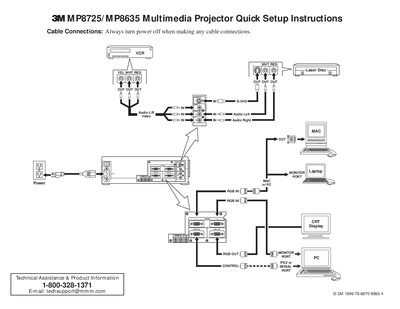
3MP8725/MP8635 Multimedia Projector Quick Setup Instructions
This document provides quick setup instructions for the 3M MP8725/MP8635 Multimedia Projector. It details cable connection procedures, including audio, video, and mouse interfaces, emphasizing that power must be off during connections.
The guide outlines the startup sequence, which involves connecting cables, turning on the main power switch, pressing the STANDBY/ON button to initiate warm-up, and adjusting zoom and focus. It also covers using the remote control transmitter for input selection (RGB or Video), image positioning, and shutdown procedures.
3M MP8725 specifications
| Resolution | XGA (1024 x 768) |
|---|---|
| Colors | 16.7 million colors |
| Warranty Period | Two years |
All 3M MP8725 documents by type
Day-to-day operation, settings and troubleshooting. Start here if the product is already set up.
The shortest path to a working setup, usually only a few pages.
Questions answered in these manuals
What is the warranty period for this projector?
3M warrants the product against defects in material and workmanship for a period of two years from the date of purchase.
What environments are not tested for use with this projector?
The projector has not been tested for outdoor operation, environments containing heavy cigarette smoke, or the use of non-3M brand lamps.
What is the reset period after turning off the projector?
There is a 60 second reset period before the STANDBY/ON button will function again.
From: 3MP8725/MP8635 Multimedia Projector Quick Setup Instructions
What safety precaution must be taken before connecting cables?
You must always turn the power off when making any cable connections.
From: 3MP8725/MP8635 Multimedia Projector Quick Setup Instructions
What is the warranty period for this projector?
The product is warranted against defects in material and workmanship for two years from the date of purchase.
What happens if I operate the projector outdoors?
Operating the appliance outside is not recommended as it has only been designed, built, and tested for indoor use.