
Key facts
- Brand
- NEC
- Model
- NP2200
- Industry
- Electronics
- Documents
- 4
- Languages
- JA · SV · EN
- Last added
- 2012-05-10
Start here
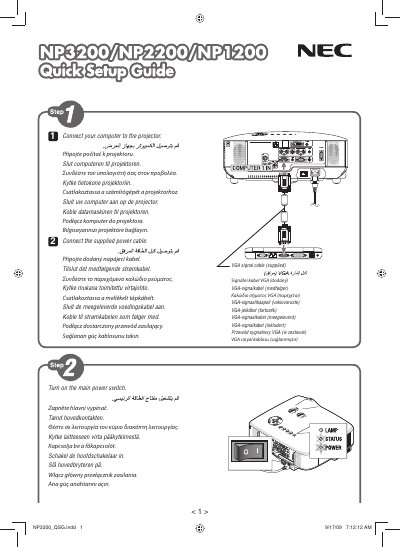
NEC NP3200 NP2200 NP1200 Quick Setup Guide
This guide provides the essential steps to install, power up, and begin using the NEC NP3200, NP2200 and NP1200 display models. It includes safety notes, connection diagrams, and initial configuration procedures.
The document is intended for end‑users and installers who need a fast start to get the displays operational, covering basic wiring, power requirements, and basic menu navigation. This manual is written in Japanese.
All NEC NP2200 documents by type
Day-to-day operation, settings and troubleshooting. Start here if the product is already set up.
The shortest path to a working setup, usually only a few pages.
Disassembly, diagnostics and part numbers, for repair.
Questions answered in these manuals
Which NEC models are covered by this guide?
The guide covers the NEC NP3200, NP2200 and NP1200 display models.
Who printed the Quick Setup Guide?
It was printed in China by NEC Display Solutions, Ltd.
How far should the projector be from walls for proper ventilation?
Leave at least 10 cm of clearance between the projector and surrounding walls.
How long must I wait after turning off the projector before using the direct‑shutoff function?
Wait at least 20 minutes after the projector is turned off before using the direct‑shutoff feature.
What service options are available for the NEC projector?
There are three types of service: Repair and Return, Repair and Return with Loan, and Loan Only.
How much does the loan unit cost and for how long can it be used?
The loan unit costs $200 and can be used for up to 12 calendar days.