
This document provides quick setup instructions and technical support information for a multimedia projector called 3MP8780. The product features various connection options and uses, including CRT display connection, RGB input, component input, and CV/S connection. The projector also supports connections with multiple devices, such as computers, video equipment, and BNC connections.
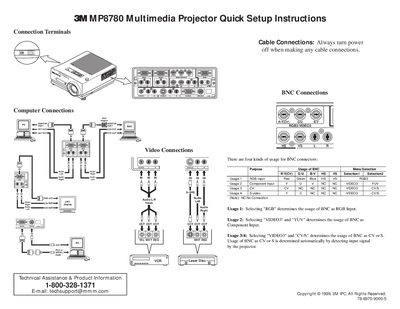
This document provides quick setup instructions for the 3M MP8780 Multimedia Projector. It details the various cable connections available, including BNC connectors for RGB, Component, CV, and S-video inputs, as well as VGA and audio options. The guide explains how to configure these inputs via the projector's menu selection.
Press the RGB/VIDEO button on the projector or remote to select the source of the signal to be projected.
There is a 90 second reset period before the STANDBY/ON button will function again.
The fan continues to run for approximately 90 seconds to cool the projector.