
This is a quick setup guide for the 3M MP8730/MP8740 multimedia projector
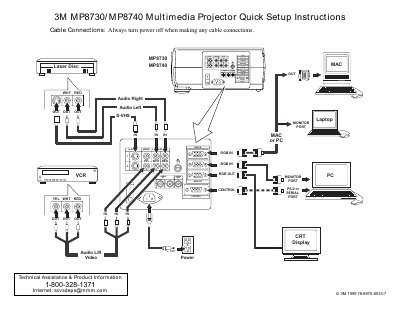
This document provides quick setup instructions for the 3M MP8730 and MP8740 multimedia projectors. It details the necessary cable connections, including VGA, S-Video, and audio cables, and lists the items included in the projector packout. The guide also explains how to use the remote control transmitter for various functions such as adjusting focus, zoom, and navigating menus.
| Power Voltage (US) | 110V |
|---|---|
| Power Voltage (UK, Europe) | 220V |
| Video Input Type | S-Video mini DIN4-pin |
Set the main power switch to ON, then press and hold the STANDBY/ON button until the ON indicator lights green.
Always turn the power off when making any cable connections.