
This document is 3MP8725/MP8635 Multimedia Projector Quick Setup Instructions, which mainly introduces the connection method and usage methods of this product.
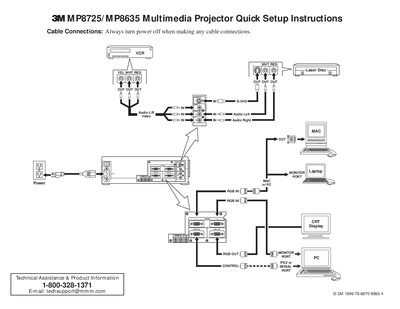
This document provides quick setup instructions for the 3M MP8725/MP8635 Multimedia Projector. It details cable connection procedures, including audio, video, and mouse interfaces, emphasizing that power must be off during connections.
The guide outlines the startup sequence, which involves connecting cables, turning on the main power switch, pressing the STANDBY/ON button to initiate warm-up, and adjusting zoom and focus. It also covers using the remote control transmitter for input selection (RGB or Video), image positioning, and shutdown procedures.
There is a 60 second reset period before the STANDBY/ON button will function again.
You must always turn the power off when making any cable connections.
There is a 60 second reset period before the STANDBY/ON button will function again.
The fan rotates for about 1 minute to cool the projector.