
This document is a guide for connecting and controlling the VIS-78A CRT display and MP8640 laser disc VCR. It also provides information about the interfaces and features of the display.
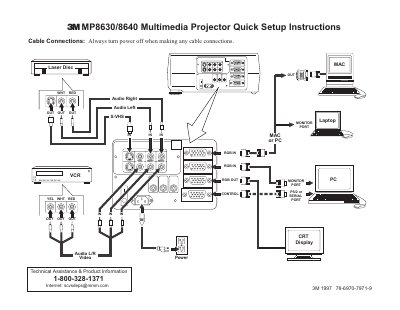
This document provides quick setup instructions for the 3M MP8630/8640 Multimedia Projector. It includes a diagram of cable connections to input devices such as Laser Disc players, S-VHS, and PCs, along with a list of items included in the projector packout like power cords, video cables, and remote control transmitters.
You must always turn the power off when making any cable connections.
Press and hold the STANDBY/ON button for 3-5 seconds.
The fan motor will run for about 1 minute to cool the projector.