
Key facts
- Brand
- Philips
- Model
- HD4777
- Documents
- 4
- Languages
- ZH · EN
- Last added
- 2012-03-22
Start here
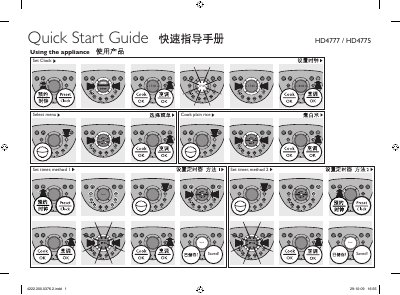
Philips HD4777 / HD4775 Rice Cooker Quick Start Guide
This guide shows how to set the language and clock, select cooking functions such as plain rice, keep‑warm, reheat, and use the timer methods. It also explains how to use the preset feature and how to adjust the clock to the desired time.
The document details the use of optional accessories – steam basket, double‑boil pot and yogurt pots – and provides water‑level indications, reminding users not to exceed the maximum level marked inside the inner pot for each menu. This manual is written in Chinese.
Philips HD4777 specifications
| Power | 825 W |
|---|---|
| Keep‑warm time | 12 hours |
| Height | 289.7 mm |
| Depth | 249.4 mm |
All Philips HD4777 documents by type
Day-to-day operation, settings and troubleshooting. Start here if the product is already set up.
The shortest path to a working setup, usually only a few pages.
Questions answered in these manuals
How do I set the clock on the HD4777/HD4775?
Select the clock setting option and adjust the time, e.g., 17:45, as shown in the guide.
What is the water‑level limit for each cooking menu?
Do not exceed the maximum water level marked inside the inner pot for the selected menu.
How does the backup function work after a power failure?
The rice cooker remembers its previous status if power is restored within 2 hours; otherwise it resets to standby mode and you must start the cooking process again.
How many cooking programs does the HD4777 have?
It provides 30 different cooking programs.
How long can the keep‑warm function operate?
The keep‑warm function can maintain rice for up to 12 hours.
How do I set the clock on the rice cooker?
Press the Preset/Clock button twice, move the control ring to select “Clock setting”, then press Cook/OK to confirm the time.