
Key facts
- Brand
- Philips
- Model
- AC4072
- Category
- Air Cleaners Purifiers
- Industry
- Appliances
- Documents
- 2
- Languages
- EN · ZH
- Last added
- 2012-03-22
Start here
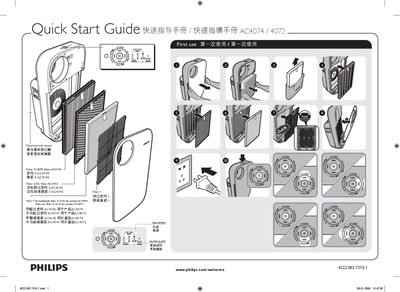
Philips AC4074/AC4072 Air Purifier Quick Start Guide
This Quick Start Guide provides the first‑use instructions for the Philips AC4074 and AC4072 air purifiers. It lists the required filters, their part numbers, and shows how to install or replace them.
The guide also explains how to clean the particle sensor, adjust fan speed, and use the smart‑lock feature. Step‑by‑step procedures are given for each task, with reference images labeled in the document. This manual is written in Chinese.
Philips AC4072 specifications
| Pre‑filter antibacterial treatment | Yes |
|---|---|
| HEPA filter coating | Anti‑bacterial |
| Fan speed indicator | AC4074 only |
| Air quality light ring | Present |
All Philips AC4072 documents by type
Day-to-day operation, settings and troubleshooting. Start here if the product is already set up.
The shortest path to a working setup, usually only a few pages.
Questions answered in these manuals
How can I register my Philips AC4074/AC4072 air purifier?
Register the product at www.philips.com/welcome to receive support and updates.
What clearance space is required around the air purifier?
Leave at least 20 cm of free space on each side and at least 30 cm above the appliance.
How do I replace the filters?
Follow the steps described for filters 2, 3 and 4 to replace the filter elements.
How do I clean the particle sensor?
Clean the particle sensor as shown in section A of the guide.