
Key facts
- Brand
- Philips
- Model
- 5505 系列
- Industry
- Electronics
- Documents
- 14
- Languages
- DE · EN · CS · NL · UK · ZH
- Last added
- 2026-11-22
Start here
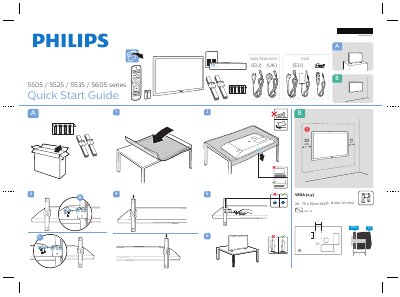
Philips 5505/5525/5535/5605 Series TV Quick Start Guide
This Philips Quick Start Guide covers the 5505, 5525, 5535, and 5605 series TVs. It provides safety instructions in multiple languages and explains how to register the product at www.philips.com/TVsupport.
The guide shows TV interfaces such as HDMI, USB, antenna, and coaxial connections, lists EU and UK power settings, and describes TV software upgrades from USB.
Philips 5505 系列 specifications
| Power | Not specified in text |
|---|---|
| Reception | Not specified in text |
| Display Resolution | Not specified in text |
| Input Resolution | Not specified in text |
| Audio | Not specified in text |
| Multimedia | Not specified in text |
| Connections | Not specified in text |
All Philips 5505 系列 documents by type
Day-to-day operation, settings and troubleshooting. Start here if the product is already set up.
- Philips TV 5505 Series User Manual 68 p
- Philips 5000 Series 24PFS5505 24PFS5525 24PFS5535 24PFS5605 24PFT5505 24PFT5525 32PFS5605 TV User Manual 66 p
- Philips TAS5505 Wireless Speaker User Manual 12 p
- Philips 5000 Series TAT5505 True Wireless Earphones User Manual 17 p
- Philips 5000 Series TV User Manual 24PFS5505-24PFS5605, 32PFS5605, 32PHS5505-32PHT5525, 43PFS5505-43PFT5525 68 p
- Philips 40PFT6550/50PFT6550/55PFT6550 Smart TV User Manual 142 p
- Philips TAS5505 Wireless Speaker User Manual 12 p
- Philips TAR5505 DAB+ Radio User Manual 15 p
- Philips 43PFT5505 Full HD Ultra Slim LED TV User Manual 2 p
- Philips 24PFS5505 Series TV User Manual 57 p
- Philips 55PFL5505D/46PFL5505D/40PFL5505D User Manual 37 p
The shortest path to a working setup, usually only a few pages.
Mounting, wiring and first power-up. Read it before the hardware goes in.
Questions answered in these manuals
How do I register my TV?
Visit www.philips.com/TVsupport to register your TV and access support, updates, and special offers.
How do I update the TV software?
Connect a USB drive with at least 256 MB free space, download the update file, copy 'autorun.upg' to the drive, then connect it to the TV and start the update.
Where can I register my Philips TV and get support?
Register your product and get support at www.philips.com/TVsupport.
From: Philips 5505/5525/5535/5605 Series TV Quick Start Guide
How do I upgrade the software on a Non-Smart TV?
Use a USB drive for the TV software upgrade.
From: Philips 5505/5525/5535/5605 Series TV Quick Start Guide
How do I update the TV software?
Use Home > Settings > Software updates > Search for updates. A USB memory device with 256 MB free space is needed for the update.
What batteries does the remote control use?
The remote control uses two AAA-R03-1.5 V batteries.