
Key facts
- Brand
- Philips
- Model
- DVP5990/DVP5992
- Industry
- Electronics
- Documents
- 3
- Languages
- EN
- Last added
- 2026-11-22
Start here
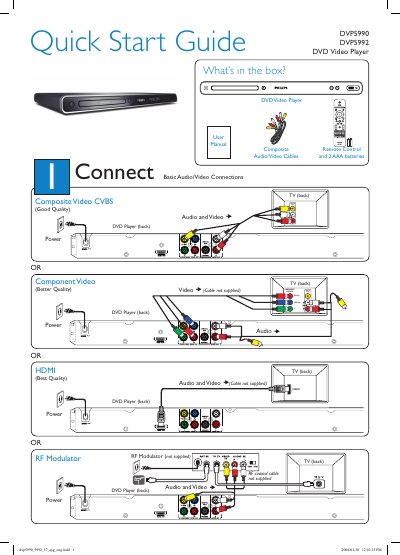
Philips DVP5990/DVP5992 DVD Video Player Quick Start Guide
This guide helps you set up your Philips DVD player quickly. It explains what’s in the box, how to connect audio and video cables, and how to select your display language. You’ll also learn how to start playing a disc and troubleshoot common issues like no power or no picture.
The guide includes basic instructions for connecting via HDMI, component video, or composite video. It also covers setting the display language and navigating the DVD menu. For more detailed information, refer to the full user manual included with the device.
Philips DVP5990/DVP5992 specifications
| TV Standard | PAL/50 Hz, NTSC/60 Hz |
|---|---|
| Number of lines | 625 (PAL), 525 (NTSC) |
| Video DAC | 12 bit, 108 MHz |
| Video Output | 1 Vpp ≈ 75 Ω |
| Audio Format | Digital MPEG / AC‑3 / PCM (16‑24 bit) |
| Power consumption | < 12 W (operating), < 1 W (standby) |
| Dimensions (W × H × D) | 435 mm × 35 mm × 209 mm |
| Weight | ≈ 1.4 kg |
| Laser type | InGaAlP (DVD) / GaAs (CD) |
Source: Philips DVP5990/DVP5992 DVD Video Player User Manual
All Philips DVP5990/DVP5992 documents by type
The shortest path to a working setup, usually only a few pages.
Day-to-day operation, settings and troubleshooting. Start here if the product is already set up.
Questions answered in these manuals
How do I change the display language?
Press SETUP, select {OSD Language}, choose a language, and press OK to confirm.
From: Philips DVP5990/DVP5992 DVD Video Player Quick Start Guide
What should I do if there’s no picture?
Check the connection to the TV and ensure the plugs are firmly in place.
From: Philips DVP5990/DVP5992 DVD Video Player Quick Start Guide
How can I register my Philips DVD player for warranty?
You can register online at www.philips.com/welcome or return the enclosed Product Registration Card.
What type of laser does the DVP5990/DVP5992 use?
It uses a semiconductor InGaAlP laser for DVD playback and a GaAs laser for CD playback.
What safety precautions should I follow when handling the laser inside the DVD player?
Do not open the unit, avoid direct exposure to the laser beam, and keep the cover on to prevent electric shock.
What type of power plug should I use with this DVD player?
Use a polarized or grounding‑type plug; the wide blade or third prong is for safety.