
Key facts
Start here
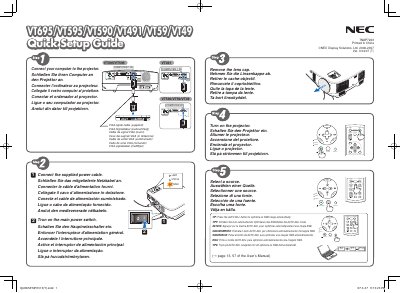
NEC VT695/VT595/VT590/VT490/VT59/VT49 Quick Start Guide
This guide provides basic connection instructions for NEC VT series projectors, including VGA cable connections, power plug, lamp status indicators, and tilt‑foot adjustment. It also explains how to safely disconnect the power cable.
The manual describes key features such as automatic keystone correction, manual keystone adjustment, and focus controls, with multilingual captions for easy reference across several languages.
NEC VT695 specifications
| Power Supply | 100‑240 V AC, 50/60 Hz |
|---|---|
| Lamp Type | High‑pressure mercury lamp |
| Maximum Tilt Angle | 10 degrees |
| Ventilation Clearance | Minimum 10 cm around the unit |
Source: NEC VT695/VT595/VT590/VT490/VT59/VT49 Projector User Manual
All NEC VT695 documents by type
Day-to-day operation, settings and troubleshooting. Start here if the product is already set up.
- NEC VT695/VT595/VT590/VT490/VT59/VT49 Projector User Manual 79 p
- NEC VT695/VT595/VT590/VT490/VT59/VT49 Projector User Manual 79 p
- NEC VT695/VT595/VT590/VT490/VT59/VT49 Projector User Manual 79 p
- NEC VT695/VT595/VT590/VT490/VT59/VT49 Projector User Manual 79 p
- NEC VT695/VT595/VT590/VT490/VT59/VT49 Portable Projector User Manual 79 p
- NEC VT695/VT595/VT590/VT490/VT59/VT49 Projector user manual(4) 79 p
- NEC VT695/VT595/VT590/VT490/VT59/VT49 Projector user manual(3) 79 p
- NEC VT695/VT595/VT590/VT491/VT49 Portable Projector User Manual 81 p
- NEC VT695/VT595/VT590/VT490/VT59/VT49 Projector user manual(2) 79 p
- NEC VT695/VT595/VT590/VT490/VT59/VT49 Projector user manual(1) 79 p
- NEC VT695/VT595/VT590/VT490/VT59/VT49 Projector user manual 79 p
- NEC VT695/VT595/VT590/VT491/VT49 Portable Projector User Manual 79 p
The shortest path to a working setup, usually only a few pages.
Questions answered in these manuals
What power supply does the projector require?
It requires a 100‑240 V AC supply at 50 or 60 Hz.
From: NEC VT695/VT595/VT590/VT490/VT59/VT49 Projector User Manual
How far should the projector be from surrounding walls for ventilation?
At least 10 cm of clearance should be left around the projector.
From: NEC VT695/VT595/VT590/VT490/VT59/VT49 Projector User Manual
How should I disconnect the projector before cleaning or servicing?
Always unplug the mains plug from the wall outlet before cleaning, lamp replacement or any service work.
From: NEC VT695/VT595/VT590/VT490/VT59/VT49 Projector User Manual
Can I install the projector on the ceiling myself?
No. Ceiling installation must be performed by qualified service personnel to ensure safe and proper mounting.
From: NEC VT695/VT595/VT590/VT490/VT59/VT49 Projector User Manual
What must I do before cleaning the projector?
Turn off the projector and disconnect the power cable before cleaning the housing or the lens.
From: NEC VT695/VT595/VT590/VT490/VT59/VT49 Projector User Manual
Can I open the projector housing for service?
No. Opening the housing can expose high‑voltage components and may cause electric shock.
From: NEC VT695/VT595/VT590/VT490/VT59/VT49 Projector User Manual