
Key facts
Start here
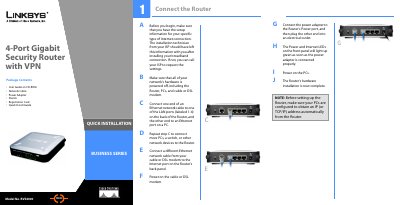
Linksys RVS4000 Business Series 4-Port Gigabit Security Router Quick Installation Guide
This Quick Installation guide covers the Linksys RVS4000, a wired security router with VPN from the Business Series that provides four Gigabit LAN ports and an Internet port. The package contains the User Guide on CD-ROM, a network cable, power adapter, stands, a registration card, and the quick install guide.
The guide first walks through the hardware setup: configuring PCs to obtain an IP address automatically, powering off the network hardware, connecting PCs to the LAN ports labeled 1-4, connecting a cable or DSL modem to the Internet port, and powering the units on. It then explains configuration through the web-based utility at http://192.168.1.1 using the default user name and password admin, including the six available Internet connection types (Automatic Configuration - DHCP, Static IP, PPPoE, PPTP, Heartbeat Signal, and L2TP). Support contacts for Linksys, including 24-hour technical support at 800-326-7114, are listed at the end.
Linksys RVS4000 specifications
| LAN ports | 4 x Gigabit |
|---|---|
| VPN support | Wired with VPN |
| Internet connection types | 6 (DHCP, Static IP, PPPoE, PPTP, Heartbeat Signal, L2TP) |
| Default router IP address | 192.168.1.1 |
| Default user name and password | admin |
Source: Linksys RVS4000 Business Series 4-Port Gigabit Security Router Quick Installation Guide
All Linksys RVS4000 documents by type
The shortest path to a working setup, usually only a few pages.
Day-to-day operation, settings and troubleshooting. Start here if the product is already set up.
Questions answered in these manuals
What is the default IP address and login for the RVS4000?
Enter http://192.168.1.1 in your browser's Address field, then log in with the default user name and password admin in lowercase letters.
From: Linksys RVS4000 Business Series 4-Port Gigabit Security Router Quick Installation Guide
Which Internet connection types can be configured on the RVS4000?
Six types are offered: Automatic Configuration - DHCP, Static IP, PPPoE, PPTP, Heartbeat Signal, and L2TP.
From: Linksys RVS4000 Business Series 4-Port Gigabit Security Router Quick Installation Guide
How do I enable IPSec Pass‑Through on the Linksys RVS4000?
Select the VPN tab, enable the ‘IPSec Pass Through’ option, and click ‘Save Settings’.
What tool is recommended for troubleshooting VPN connection problems?
Wireshark is recommended to capture and analyze traffic for VPN troubleshooting.