
This product is an enterprise-class router launched by Ruijie Networks. It has 4 Gigabit ports, supports multiple Internet access methods, and provides security protection.
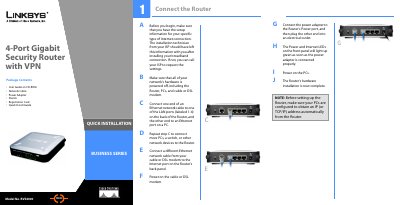
This Quick Installation guide covers the Linksys RVS4000, a wired security router with VPN from the Business Series that provides four Gigabit LAN ports and an Internet port. The package contains the User Guide on CD-ROM, a network cable, power adapter, stands, a registration card, and the quick install guide.
The guide first walks through the hardware setup: configuring PCs to obtain an IP address automatically, powering off the network hardware, connecting PCs to the LAN ports labeled 1-4, connecting a cable or DSL modem to the Internet port, and powering the units on. It then explains configuration through the web-based utility at http://192.168.1.1 using the default user name and password admin, including the six available Internet connection types (Automatic Configuration - DHCP, Static IP, PPPoE, PPTP, Heartbeat Signal, and L2TP). Support contacts for Linksys, including 24-hour technical support at 800-326-7114, are listed at the end.
| LAN ports | 4 x Gigabit |
|---|---|
| VPN support | Wired with VPN |
| Internet connection types | 6 (DHCP, Static IP, PPPoE, PPTP, Heartbeat Signal, L2TP) |
| Default router IP address | 192.168.1.1 |
| Default user name and password | admin |
Enter http://192.168.1.1 in your browser's Address field, then log in with the default user name and password admin in lowercase letters.
Six types are offered: Automatic Configuration - DHCP, Static IP, PPPoE, PPTP, Heartbeat Signal, and L2TP.
Refer to the User Guide on the CD-ROM, call 24-hour technical support at 800-326-7114 (toll-free from US or Canada), or e-mail [email protected].
The package includes the User Guide on CD-ROM, a network cable, power adapter, stands, a registration card, and the quick install guide.