
Key facts
Start here
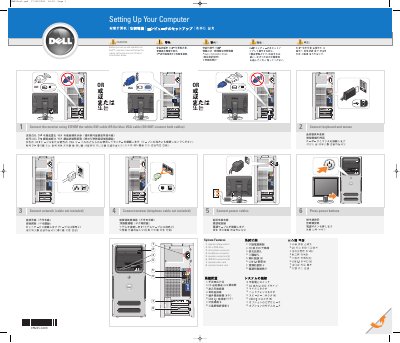
Dell 0MW452A00 Computer Quick Start Guide
This guide provides the initial setup steps for the Dell 0MW452A00 computer. It instructs users to connect the keyboard, mouse, network, modem, and power cables before pressing the power button. It also details how to connect the monitor using either a DVI or VGA cable, but not both simultaneously.
Read onlineDell A00 specifications
| Voltage Switch | manual voltage switch |
|---|---|
| CD/DVD Drive | CD or DVD drive |
| Microphone Connector | microphone connector |
| Headphone Connector | headphone connector |
| Speaker Connectors | speaker connectors (6) |
| USB 2.0 Connectors | USB 2.0 connectors (6) |
| Video Card | optional video card |
| Modem Card | optional modem card |
All Dell A00 documents by type
Day-to-day operation, settings and troubleshooting. Start here if the product is already set up.
- Dell Application Access Manager Administrator's Guide 12 p
- Dell A00 Smart Access Card Solution Administrator's Guide 52 p
- Dell 0PY351A00 Computer Setup Guide 2 p
- Dell 0XXXXXA00 Computer Setup and Operation Guide 2 p
- Dell Inspiron 27DKX A00 User Guide 2 p
- Dell OpenManage Plug-in for Oracle Enterprise Manager 12c Version 2.0 User Guide A00 Revision 27 p
- Dell Vostro FR295A00 Computer Setup Guide 2 p
- Dell 0MW452A00 Computer Setup Guide 2 p
- Dell 0GY687A00 Computer Setup Guide 2 p
- Dell 0PY350A00 Computer Setup Guide 2 p
- Windows 10 IoT Enterprise Security Patches Deployment Guide October 2020 Rev. A00 8 p
- Dell K0515A00 Computer Setup Guide 2 p
- Dell 0PY350A00 Computer Setup Guide 2 p
- Dell 0T8147A00 Computer Setup Instructions 2 p
The shortest path to a working setup, usually only a few pages.
Mounting, wiring and first power-up. Read it before the hardware goes in.
Questions answered in these manuals
How do I secure application or device functions?
Use the security page on the Embedded Web Server for eSF 3.0+ or configure via the Web browser for eSF 1.2/2.0.
How do I set the session timeout?
Set the 'Auto log out delay' or 'Panel Login Timeout' in the Embedded Web Server under Security > Miscellaneous Security Settings > Login Restrictions.
What cables are required to connect the monitor?
You must use either the white DVI cable or the blue VGA cable, but not both simultaneously.
Where can I find more information about using the computer?
You should consult the Owner's Manual for more information about using the computer.
What additional connectors does the computer have?
It has headphone, microphone, speaker, USB 2.0, and 1394 connectors.
Is a network cable included?
No, the network cable is not included.