
Key facts
- Brand
- DELL
- Model
- W2600
- Category
- Television
- Documents
- 3
- Languages
- EN · ES
- Last added
- 2023-11-24
Start here
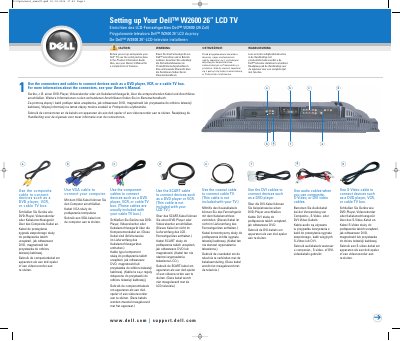
Dell W2600 26-inch LCD TV Quick Start Guide
This two-page setup guide helps install and connect the Dell W2600 26-inch LCD TV. It shows cable connections for devices such as DVD players, VCRs, cable TV boxes, and computers, plus remote control battery installation.
It also explains how to select the correct input source, access the on-screen display, and set up channels. The guide refers to the Owner's Manual and Product Information Guide for complete features and safety instructions.
Dell W2600 specifications
| Composite video output | 1 (bottom) |
|---|---|
| Audio output | RCA left and right pair |
| Headphone jack | 1 (side) |
| Sound effects | SRS TruSurround XT |
| Built-in speakers | 15 W per channel, 30 W total |
All Dell W2600 documents by type
The shortest path to a working setup, usually only a few pages.
Day-to-day operation, settings and troubleshooting. Start here if the product is already set up.
Questions answered in these manuals
How do I select the correct input source?
Press Input on the remote control, then choose the source that matches the connectors used.
How do I connect a computer to the TV?
Use a VGA cable.
What color is the power indicator light when the TV is on?
The light is blue when the TV is on and amber in power-saving mode.
How can the TV be used as a computer monitor?
Connect a computer to the VGA connector to use the TV as a monitor.
How do I connect my computer to the Dell W2600 TV?
Use the VGA cable to connect your computer.
Which input source should I select for the ANT/Cable connector?
Select TV from the Input Select menu.