
Dell 0XXXXXA00 Computer Setup and Operation Guide

This document describes how to set up and operate a Dell computer.
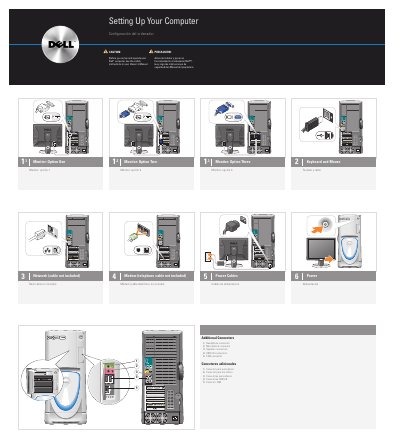

Dell 0XXXXXA00 Computer Setup and Operation Guide - cover page
Brand
DELL
Category
Desktops
Document type
User Manual
Language
English
Pages
2
File format
PDF
File size
2.8 MB
Published
24 November, 2023
Updated
24 November, 2023
MD5 checksum
C8C4C0383A88E970E72C1BA67E448130

About this manual

This document provides instructions for setting up a Dell computer, including connecting peripherals such as the keyboard, mouse, and monitor. It details options for connecting to a network, modem, and power source, as well as the use of additional connectors for headphones, microphones, speakers, USB 2.0, and 1394 devices.

What's inside

  • Keyboard and Mouse
  • Monitor
  • Network
  • Modem
  • Power Cables
  • Additional Connectors
  • Safety Instructions
  • Finding Answers

Frequently asked questions

What additional connectors does the computer have?

It has headphone, microphone, speaker, USB 2.0, and 1394 connectors.

Is a network cable included?

No, the network cable is not included.

What should I do before setting up and operating the computer?

See the safety instructions in your Owner's Manual.

What if I ordered Windows XP Media Center Edition?

Connect the components as described in the Media Center setup instructions that came with your computer.

Download PDF (2.8 MB)

More DELL Manuals


View all DELL manuals →