
This document is a product manual printed by NEC Viewtechnology, Ltd. in Japan in 2004-2005, which introduces the VT676/VT670/VT575/VT470 VT47 model projectors. The projector has multiple input and output interfaces, including audio input, video input, computer input, and monitor output. Additionally, the projector comes with a power cable and an RGB signal cable. Users can connect these cables to connect the projector to a computer or other devices to transmit and control images and sound.
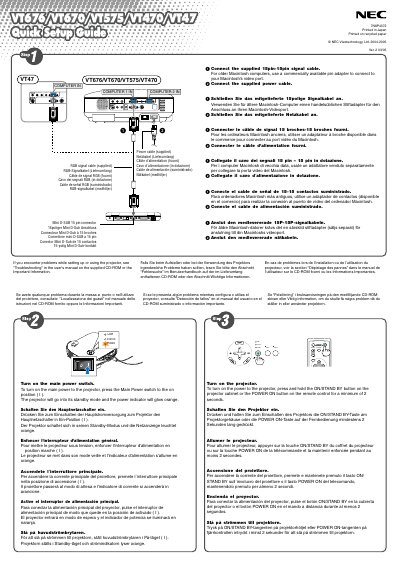
This guide shows how to connect the supplied power and 15‑pin RGB signal cables to the projector. For older Macintosh computers, a pin adapter is required. After connecting, turn on the projector by pressing the Main Power switch or holding the ON/STAND BY button for at least two seconds; the power indicator will glow orange.
Select the video source using the COMPUTER 1 or COMPUTER 2 button on the remote. Use the AUTO ADJ. button for automatic RGB image optimization. Adjust the tilt foot, zoom lever, and focus ring as needed, and enable Auto Keystone correction to correct vertical distortion automatically.
Connect the supplied 15‑pin signal cable and use a commercially available pin adapter for older Macintosh video ports.
Enable Auto Keystone correction; it automatically corrects vertical distortion without any special operation.
Use the Zoom lever to fine‑tune image size and the Focus ring to obtain the best focus.