
Key facts
- Brand
- NEC
- Model
- NP62
- Industry
- Electronics
- Documents
- 3
- Languages
- EN · ZH
- Last added
- 2012-05-10
Start here
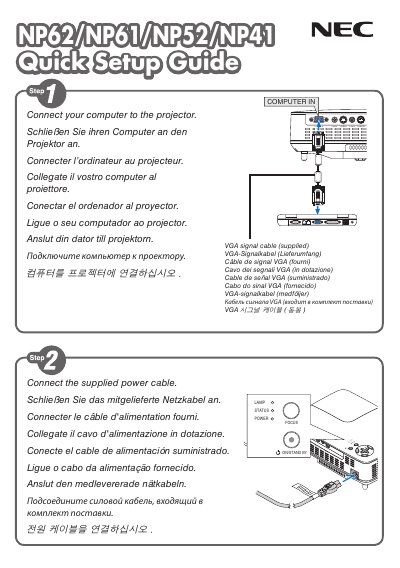
NEC NP62 NP61 NP52 NP41 Quick Setup Guide
This guide provides fast‑track instructions for installing and configuring NEC NP62, NP61, NP52 and NP41 display units. It covers basic connections, power‑on procedures and essential first‑use settings.
A helpful tip explains how to automatically adjust the RGB image using the AUTO ADJ. button, ensuring optimal picture quality right out of the box.
NEC NP62 specifications
| Power Supply Voltage | 100‑240 V AC 50/60 Hz (NP62/NP61/NP41) or 200‑240 V AC 50/60 Hz (NP62G/NP61G/NP52G/NP41G) |
|---|---|
| Lamp Type | High‑pressure mercury lamp |
| Maximum Sound Pressure Level | < 70 dB(A) |
| High‑Altitude Fan Setting | Set FAN MODE to HIGH ALTITUDE above ~5000 ft (1500 m) |
Source: NEC NP62/NP61/NP52/NP41 Portable Projector User Manual
All NEC NP62 documents by type
Day-to-day operation, settings and troubleshooting. Start here if the product is already set up.
The shortest path to a working setup, usually only a few pages.
Questions answered in these manuals
How do I automatically adjust the RGB image on the display?
Press the AUTO ADJ. button to optimize an RGB Image automatically.
What does the AUTO ADJ. button do?
It optimizes the RGB image automatically when pressed.
How do I know when to replace the lamp?
Replace the lamp when the message "THE LAMP HAS REACHED THE END OF ITS USABLE LIFE. PLEASE REPLACE THE LAMP." appears on the screen.
From: NEC NP62/NP61/NP52/NP41 Portable Projector User Manual
What safety step must be taken before servicing the projector?
Turn off the main power and remove the plug from the power outlet before any service or cleaning.
From: NEC NP62/NP61/NP52/NP41 Portable Projector User Manual
How should the lamp be replaced?
Replace the lamp according to the instructions on page 67 and when the “lamp life exceeded” message appears.
From: NEC NP62+/NP61+/NP52+/NP41+ Portable Projector User Manual
What clearance is required for ventilation?
Keep at least 10 cm between the projector and any wall or surface to ensure proper airflow.
From: NEC NP62+/NP61+/NP52+/NP41+ Portable Projector User Manual