
The document is a quick setup guide for the NP610/NP510/NP410/NP405/NP310/NP305 NP510W/NP410W/NP610S/NP510WS projectors. It explains how to connect a computer to the projector and provides step-by-step instructions for connection and power on.
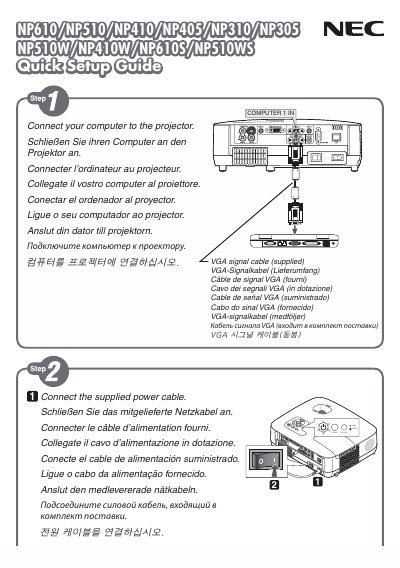
The Quick Setup Guide walks you through the essential steps to connect the projector to a computer, select the appropriate input source, and adjust basic picture settings. It includes instructions for using the AUTO ADJ button to automatically optimize the displayed image.
Additional menu options such as KEYSTONE, WALL COLOR, and ECOMODE are described, allowing you to fine‑tune the projector's performance and customize features like closed captioning and power settings. This manual is written in Japanese.
Press the AUTO ADJ button to optimize the computer image automatically.