
Key facts
- Brand
- Philips
- Model
- DVP3520
- Industry
- Electronics
- Documents
- 4
- Languages
- ZH
- Last added
- 2026-11-22
Start here
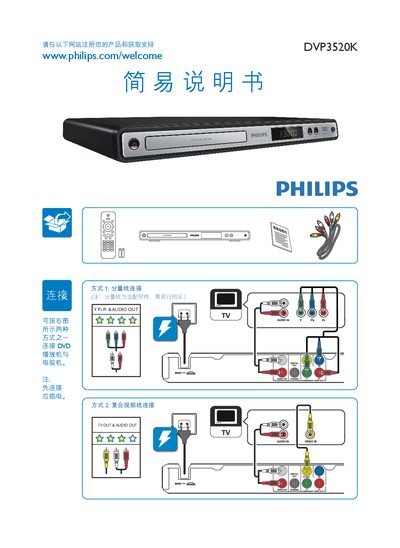
Philips DVP3520K DVD Player Quick Start Guide
The guide provides step‑by‑step instructions for connecting the DVD player to a TV using either the AV or component video cables, powering the unit, and starting playback of a disc. It also lists the accessories included with the product.
Technical specifications such as video output levels, audio format, power consumption, dimensions, and laser details are summarized, along with environmental protection symbols and usage periods for hazardous substances. This manual is written in Chinese.
Philips DVP3520 specifications
| Video signal format | PAL / NTSC |
|---|---|
| Composite video output | 1 Vpp ~ 75 Ω |
| Component video output | 0.7 Vpp ~ 75 Ω |
| Audio output | Analog stereo |
| Signal‑to‑noise ratio (1 kHz) | > 90 dB A‑weighted |
| Dynamic range (1 kHz) | > 80 dB A‑weighted |
| Power supply voltage | 110‑240 V, 50/60 Hz |
| Power consumption (standby) | < 1 W |
| Dimensions (W × H × D) | 360 × 39 × 209 mm |
| Net weight | ≈ 1.37 kg |
| Laser type | Semiconductor InGaAIP (DVD), AIGaAs (CD) |
| Laser wavelength | 657 nm (DVD), 790 nm (CD) |
| Laser output power | 7.0 mW (DVD), 10.0 mW (CD) |
All Philips DVP3520 documents by type
Day-to-day operation, settings and troubleshooting. Start here if the product is already set up.
The shortest path to a working setup, usually only a few pages.
Questions answered in these manuals
What disc formats does the Philips DVP3520 support?
It supports DVD, DVD-Video, DVD+R/+RW, DVD-R/-RW, DVD+R/-R DL (double layer), Video CD, SVCD, CD audio, CD-R/CD-RW, MP3, WMA, DivX (Ultra), and JPEG files.
What is the laser class of this device?
It is a Class 1 laser product, meaning it emits invisible and visible laser radiation only when opened and interlocks are defeated.
How do I connect the DVP3520K DVD player to my TV?
Connect the player to the TV using either the AV cable or the component video cable as shown, then plug in the power cord before turning on the devices.
What are the video output options of the player?
The player provides a composite video output (1 Vpp ≈ 75 Ω) and a component video output (0.7 Vpp ≈ 75 Ω).
How do I register my product?
Register your product and get support at www.philips.com/welcome.
What is the language code for English?
The language code for English is 6978.