
Key facts
Start here
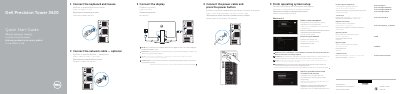
Dell Precision Tower 3620 Quick Start Guide
This Quick Start Guide covers the initial setup of the Dell Precision Tower 3620, including connecting the keyboard, mouse, power cable, network cable, and display, then finishing operating system setup and signing in to a Microsoft account or creating a local account.
It lists the computer's front and rear features, such as USB connectors, audio jacks, DisplayPort and HDMI ports, expansion-card slots, and the network connector, and provides links to Dell product support and regulatory information.
Dell Precision Tower 3620 specifications
| Regulatory model | D13M |
|---|---|
| Input voltage | 100 V CA–204 V CA |
| Input frequency | 50 Hz/60 Hz |
| Output current | 5,0 A |
All Dell Precision Tower 3620 documents by type
The shortest path to a working setup, usually only a few pages.
Disassembly, diagnostics and part numbers, for repair.
Questions answered in these manuals
How do I connect the display if I ordered a discrete graphics card?
Connect the display to the discrete graphics card.
What should I enter when connecting to a secured wireless network?
Enter the password for the wireless network access when prompted.
Where should the display be connected if the computer has a discrete graphics card?
Connect the display to the discrete graphics card.
What should be entered when connecting to a secured wireless network?
Enter the password for the wireless network access when prompted.
What should I do if I ordered the computer with a discrete graphics card?
Connect the display to the discrete graphics card instead of the standard display port.
What is required to connect to a secured wireless network?
Enter the password for the wireless network access when prompted.