
Quick setup guide for Philips DVD players DVP5990 and DVP5992, covering connections, language settings, and basic playback.
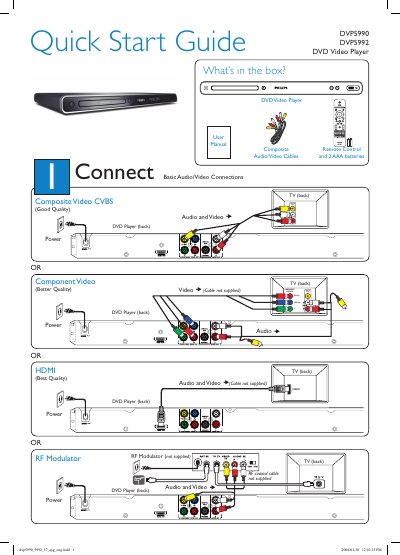
This guide helps you set up your Philips DVD player quickly. It explains what’s in the box, how to connect audio and video cables, and how to select your display language. You’ll also learn how to start playing a disc and troubleshoot common issues like no power or no picture.
The guide includes basic instructions for connecting via HDMI, component video, or composite video. It also covers setting the display language and navigating the DVD menu. For more detailed information, refer to the full user manual included with the device.
Press SETUP, select {OSD Language}, choose a language, and press OK to confirm.
Check the connection to the TV and ensure the plugs are firmly in place.