
Key facts
- Brand
- HP
- Model
- V5020U
- Category
- Digital cameras
- Documents
- 2
- Languages
- EN
- Last added
- 2012-06-04
Start here
HP V5020U Camcorder Quick Start Guide
Quick Start Guide 4 pages · 3.4 MB · EN
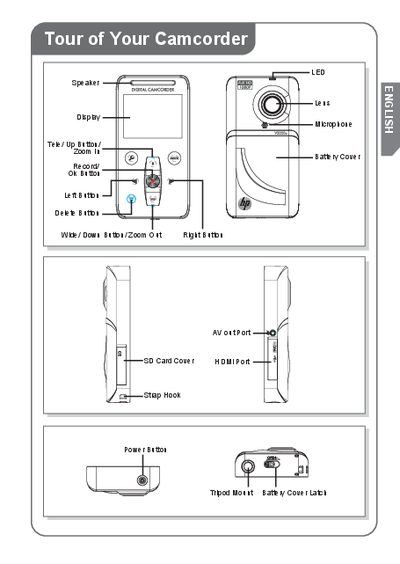
This guide introduces the HP V5020U camcorder, showing the layout of buttons, ports, and accessories. It explains how to install the lithium‑ion rechargeable battery, insert and remove the SD memory card, and power the device safely.
The guide also details how to connect the camcorder to a computer, install the bundled ArcSoft Media Impressions software, and import recorded video and photos using the AutoPlay interface.
HP V5020U specifications
| Battery type | Lithium‑ion rechargeable |
|---|---|
| Charging time (AC adapter) | 3 to 5 hours |
| Charging time (USB cable) | 5 to 9 hours |
All HP V5020U documents by type
Quick Start Guide 1
The shortest path to a working setup, usually only a few pages.
User Manual 1
Day-to-day operation, settings and troubleshooting. Start here if the product is already set up.
Questions answered in these manuals
How long does it take to fully charge the battery?
A full charge takes about 5 to 9 hours when charging from a PC/Laptop USB port.
What type of memory card is recommended for the camcorder?
Use a class 4 or greater SD/SDHC memory card larger than 2 GB.