
This document describes the usage and features of a camcorder, including button functions, SD card insertion and removal, battery charging, etc.
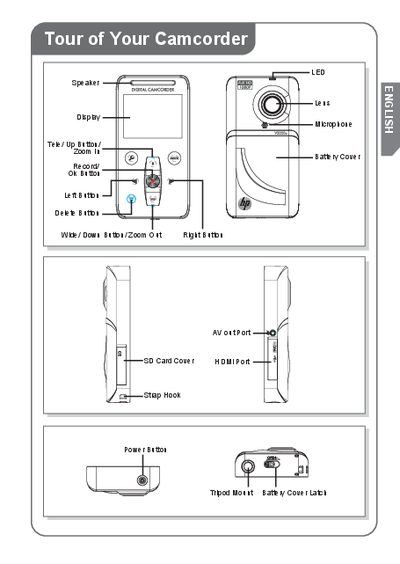
This guide introduces the HP V5020U camcorder, showing the layout of buttons, ports, and accessories. It explains how to install the lithium‑ion rechargeable battery, insert and remove the SD memory card, and power the device safely.
The guide also details how to connect the camcorder to a computer, install the bundled ArcSoft Media Impressions software, and import recorded video and photos using the AutoPlay interface.
| Battery type | Lithium‑ion rechargeable |
|---|---|
| Charging time (AC adapter) | 3 to 5 hours |
| Charging time (USB cable) | 5 to 9 hours |