
Key facts
Start here
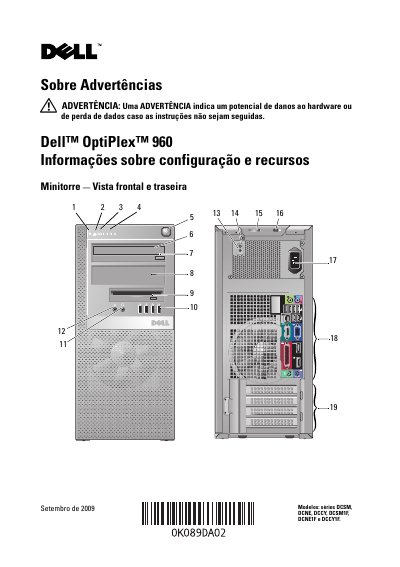
Dell OptiPlex 960 Desktop Computer Setup and Resource Information
This document provides setup and resource information for the Dell OptiPlex 960 desktop computer, covering minitower, desktop, and small form factor models. It includes front and rear panel views with numbered callouts for ports, buttons, drives, and expansion slots.
A quick setup section explains how to connect monitors, USB devices, network cables, modems, and power cords. Technical specifications cover video, drives, power, physical dimensions, weight, and environmental requirements. This manual is written in Portuguese.
Dell Optiplex 960 specifications
| Chipset | Intel Q45 Express Chipset with ICH10DO |
|---|---|
| BIOS configuration | SPI (Serial Peripheral Interface), 64 Mbit (8 MB) |
| TPM | TPM 1.2 security device, 16 KB |
| NIC EEPROM | LOM configuration contained within SPI_FLASH; no dedicated LOM EEPROM |
| Chassis volume (MT/DT/SFF) | 32.62 / 15.08 / 8.00 liters |
| Chassis weight (MT/DT/SFF) | 25.3 lb / 11.5 kg; 16.5 lb / 7.5 kg; 13.0 lb / 5.9 kg |
| MT chassis dimensions (H x W x D) | 16.06 x 7.36 x 16.96 in (40.80 x 18.70 x 43.08 cm) |
All Dell Optiplex 960 documents by type
Day-to-day operation, settings and troubleshooting. Start here if the product is already set up.
- Dell Optiplex 960 Systems Management Administrator's Guide 70 p
- Dell OptiPlex 960 Setup and Quick Reference Guide 66 p
- Dell OptiPlex 960 Configuration and Features Guide 12 p
- Dell OptiPlex 960 Desktop Computer Setup and Quick Reference Guide 80 p
- Dell OptiPlex 960 Quick Reference Guide 76 p
- Dell OptiPlex 960 Computer Setup and Quick Reference Guide 70 p
- Dell OptiPlex 960 User Guide 12 p
- Dell OptiPlex 960 Setup and Quick Reference Guide 66 p
The shortest path to a working setup, usually only a few pages.
Disassembly, diagnostics and part numbers, for repair.
Questions answered in these manuals
How can I contact Dell support?
Call 800-WWW-DELL or visit support.dell.com and choose a country or region.
From: Dell Optiplex 960 Systems Management Administrator's Guide
Which operating systems support Dell Factory Image Restore?
Dell Factory Image Restore is available for Windows Vista and Windows XP.
From: Dell Optiplex 960 Systems Management Administrator's Guide
Which operating systems can be preinstalled on the OptiPlex 960?
One of Windows Vista, Windows XP Professional via downgrade rights, or FreeDOS for n-series systems may be preinstalled.
What chipset does the OptiPlex 960 use?
It uses the Intel Q45 Express Chipset with ICH10DO.
What models does this guide cover?
This guide covers the Dell OptiPlex 960 models DCSM, DCNE, and DCCY.
How much memory can the system support?
The system supports a maximum of 8 GB of memory.