
The Dell™ OptiPlex™ 960 is a desktop computer that features: - Intel Core2 Duo Processor E8400 - 2GB of memory - 250GB hard drive - DVD burner - 17-inch LCD monitor - Windows Vista Home Premium operating system
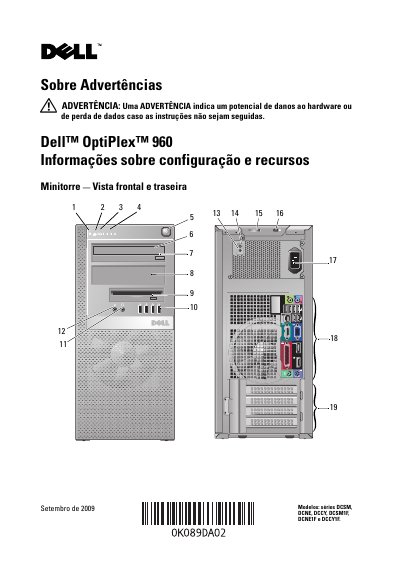
This document provides configuration and feature information for the Dell OptiPlex 960 series, covering Mini Tower, Desktop, and Small Form Factor models. It details the location and function of various ports, buttons, and lights on the front and rear of the device. This manual is written in Portuguese.
| Power Supply (Mini Tower) | 305 W (standard); 255 W (EPA) |
|---|---|
| Power Supply (Desktop) | 255 W (standard or EPA) |
| Power Supply (Small Form Factor) | 235 W (standard or EPA) |
| Height (Mini Tower) | 40.8 cm (16.06 inches) |
| Height (Desktop) | 39.7 cm (15.61 inches) |
| Height (Small Form Factor) | 29.0 cm (11.40 inches) |
| Weight (Mini Tower) | at least 11.5 kg (25.3 lb) |
| Weight (Desktop) | at least 7.5 kg (16.5 lb) |
| Weight (Small Form Factor) | at least 5.9 kg (13.0 lb) |
A flashing amber light indicates there is a problem with the system board.
A continuous blue light means the computer is not reading or writing data to the hard drive.
The operating temperature range is 10° to 35 °C (50° to 95 °F).