
The Dell™ OptiPlex™ 960 is a desktop computer that has the following features:
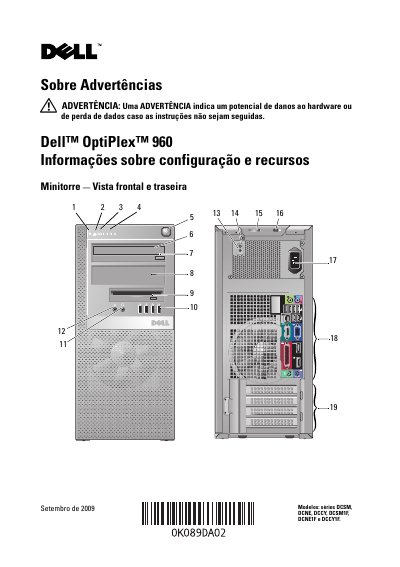
This document provides setup and resource information for the Dell OptiPlex 960 desktop computer, covering minitower, desktop, and small form factor models. It includes front and rear panel views with numbered callouts for ports, buttons, drives, and expansion slots.
A quick setup section explains how to connect monitors, USB devices, network cables, modems, and power cords. Technical specifications cover video, drives, power, physical dimensions, weight, and environmental requirements. This manual is written in Portuguese.
| Integrated video | Intel® Graphics Media Accelerator 4500 |
|---|---|
| Discrete video | ATI Radeon HD3450 256 M |
| Discrete video | ATI Radeon HD3470 256 M |
| Power supply (minitower) | 305 W standard; 255 W EPA |
| Power supply (small form factor) | 235 W standard or EPA |
| Coin cell battery | 3 V lithium CR2032 |
| Operating temperature | 10° to 35 °C (50° to 95 °F) |
| Relative humidity | 20% to 80% non-condensing |
A solid blue power light indicates that the computer is turned on.
The operating temperature ranges from 10° to 35 °C (50° to 95 °F).
It describes connecting the monitor, USB devices, an optional network cable, an optional modem, and power cords.