
MultiSync MT Series LCD Projectors Quick Connect Guide introduces how to connect the projector
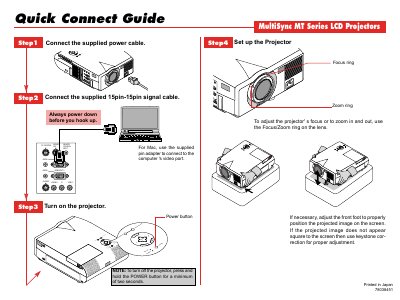
The Connect Guide provides step‑by‑step instructions for powering up the projector, attaching the 15‑pin signal cable, and adjusting focus and zoom using the lens rings. It also explains how to set up the remote mouse, including the supplied serial cable and adapter for PC or Mac.
Additional details cover remote control functions such as source selection, auto‑adjust, menu navigation, mouse‑pad operation, laser pointer activation, and picture mute. The guide notes safety reminders like powering down both projector and computer before connecting cables.
| Power‑off hold time | minimum two seconds |
|---|---|
| LED indicator | flashes when any button is pressed |
Press and hold the POWER button for at least two seconds.
Select COMPUTER on the remote control, then the mouse pad works as a mouse for the PC.
It adjusts the horizontal/vertical position, pixel and resolution of the current image for optimal display.