
Key facts
- Brand
- DELL
- Model
- Wyse 3010
- Category
- Other Computer Accessories
- Documents
- 16
- Languages
- EN · ZH · MUL
- Last added
- 2023-11-24
Start here
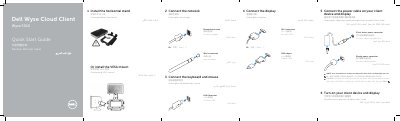
Dell Wyse Cloud Client Wyse 3010 Quick Start Guide
This Quick Start Guide covers the Dell Wyse Cloud Client Wyse 3010. It describes how to install the horizontal stand or VESA mount, connect the keyboard, mouse, display, network, and power cable, and turn on the client device and display.
The guide lists product features such as microphone and headphone jacks, USB 2.0 ports, an SD card slot, activity light, power button, wireless antenna port, DVI-I port, product information tab, 10/100/1000 Base-T network port, +12V DC power adapter input, and lock receptacle. It also includes Dell support contacts and regulatory compliance information.
Dell Wyse 3010 specifications
| USB 2.0 ports | 2 |
|---|---|
| SD card slot | Available only on some 3010 devices |
| Power on/off button and light | Included |
| Wireless antenna port | Optional |
| DVI-I port | 1x DVI-D/1x VGA |
| Network port | 10/100/1000 Base-T |
| Power adapter input | +12V DC |
| Mount options | Horizontal stand/VESA mount |
| Product information tab | Included |
All Dell Wyse 3010 documents by type
The shortest path to a working setup, usually only a few pages.
- Dell Wyse Cloud Client Wyse 3010 Quick Start Guide 2 p
- Dell Wyse 3010 Cloud Client Quick Start Guide 2 p
- Dell Wyse 3010 Cloud Client Quick Start Guide 2 p
- Dell Wyse Cloud Client Wyse 3010 Quick Start Guide 2 p
- Dell Wyse 3010 Cloud Client Quick Start Guide 2 p
- Dell Wyse 3010 Cloud Client Quick Start Guide 2 p
- Dell Wyse 3010 Cloud Client Quick Start Guide 2 p
- Dell Wyse Cloud Client Wyse 3010 Quick Start Guide 2 p
- Dell Wyse Cloud Client Wyse 3010 Quick Start Guide 2 p
- Dell Wyse Cloud Client Wyse 3010 Quick Start Guide 2 p
- Dell Wyse Cloud Client Wyse 3010 Quick Start Guide 2 p
- Dell Wyse Cloud Client Wyse 3010 Quick Start Guide 2 p
- Dell Wyse 3010 Cloud Client Quick Start Guide 2 p
- Dell Wyse 3010 Cloud Client Quick Start Guide 2 p
- Dell Wyse 3010 Cloud Client Quick Start Guide 2 p
- Dell Wyse 3010 Cloud Client Quick Start Guide 2 p
Questions answered in these manuals
How do I know the client device is ready to use?
It is ready when the client device activity light goes off.
Can components vary based on model and location?
Yes, components may vary based on model and location.
When is the client device ready to use?
The client device is ready to use when the client device activity light goes off.
Do components vary by model and location?
Yes, components may vary based on model and location.
How do I know when the device is ready to use?
The client device is ready to use when the client device activity light goes off.
Does the Wyse 3010 have an SD card slot?
Yes, but it is available only on some 3010 devices.