
Key facts
- Brand
- DELL
- Model
- OptiPlex 7450
- Category
- All-in-One Desktops
- Documents
- 24
- Languages
- RO · EN · MUL
- Last added
- 2023-11-25
Start here
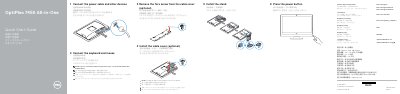
Dell OptiPlex 7450 All-in-One Quick Start Guide
This quick start guide provides step-by-step instructions for setting up the Dell OptiPlex 7450 All-in-One desktop. It covers connecting the power cable, keyboard, and mouse, optionally installing the cable cover and stand, and pressing the power button to turn on the system.
The guide also includes a features diagram labeling all ports and components, instructions for completing Windows 10 setup such as network connection and Microsoft account sign-in, and information on Dell support apps like SupportAssist. Regulatory details and RoHS compliance data for Taiwan are provided at the end.
Dell OptiPlex 7450 specifications
| Rated voltage | 100-240 V AC |
|---|---|
| Rated frequency | 50-60 Hz |
| Rated input current | 3.0 A |
All Dell OptiPlex 7450 documents by type
Day-to-day operation, settings and troubleshooting. Start here if the product is already set up.
The shortest path to a working setup, usually only a few pages.
- Dell OptiPlex 7450 All-in-One Quick Start Guide 2 p
- Dell OptiPlex 7450 All-in-One Quick Start Guide 2 p
- Dell OptiPlex 7450 All-in-One Quick Start Guide 2 p
- Dell OptiPlex 7450 All-in-One Quick Start Guide 2 p
- Dell OptiPlex 7450 All-in-One Computer Quick Start Guide 2 p
- Dell OptiPlex 7450 All-in-One Quick Start Guide 2 p
- Dell OptiPlex 7450 All-in-One Quick Start Guide 2 p
- Dell OptiPlex 7450 All-in-One Quick Start Guide 2 p
- Dell OptiPlex 7450 All-in-One Quick Start Guide 2 p
- Dell OptiPlex 7450 All-in-One Quick Start Guide 2 p
- Dell OptiPlex 7450 All-in-One Quick Start Guide 2 p
- Dell OptiPlex 7450 All-in-One Quick Start Guide 2 p
- Dell OptiPlex 7450 All-in-One Quick Start Guide 2 p
- Dell OptiPlex 7450 All-in-One Quick Start Guide 2 p
- Dell OptiPlex 7450 All-in-One Quick Start Guide 2 p
- Dell OptiPlex 7450 All-in-One Quick Start Guide 2 p
- Dell OptiPlex 7450 All-in-One Quick Start Guide 2 p
- Dell OptiPlex 7450 All-in-One Quick Start Guide 2 p
- Dell OptiPlex 7450 All-in-One Quick Start Guide 2 p
- Dell OptiPlex 7450 All-in-One Quick Start Guide 2 p
- Dell OptiPlex 7450 All-in-One Quick Start Guide 2 p
- Dell OptiPlex 7450 All-in-One Quick Start Guide 2 p
- Dell OptiPlex 7450 All-in-One Quick Start Guide 2 p
Questions answered in these manuals
What tools are recommended before working inside the computer?
A small flat-blade screwdriver, a Phillips #1 screwdriver, and a small plastic scribe.
What should be done before working inside the computer?
Disconnect all network cables and power, then hold the power button while the computer is disconnected to ground the motherboard.
How do I connect the power cable and other devices?
Follow step 1 to connect the power cable and other devices as shown in the guide.
Is securing the cable cover with the Torx screw required?
No, securing the cable cover by using the Torx screw is optional.
What should I do if I am connecting a wireless keyboard or mouse?
See the documentation that shipped with the wireless keyboard or mouse.
Is securing the cable cover with the Torx screw required?
No, securing the cable cover with the Torx screw is optional.