
Key facts
Start here
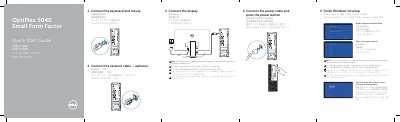
Dell OptiPlex 5040 SFF Quick Start Guide
Quick Start Guide 2 pages · 595 KB · EN
This document provides a multilingual quick start guide for the Dell OptiPlex 5040 Small Form Factor (SFF) computer. It details the initial setup steps, including connecting the keyboard, mouse, network cable, power cable, and display. A specific note advises users who ordered a computer with a discrete graphics card to connect the display to that card instead of the motherboard port.
Read onlineDell OptiPlex 5040 SFF specifications
| Regulatory model | D11S |
|---|---|
| Regulatory type | D11S001 |
| USB 2.0 connector with PowerShare | Included |
| USB 3.0 connectors | Included |
| HDMI connector | Included |
| DisplayPort connector | Included |
| VGA connector | Optional |
| Memory card reader | Optional |
| USB 2.0 connector | Supports Smart Power On |
| Operating system setup | Windows 10 |
All Dell OptiPlex 5040 SFF documents by type
Quick Start Guide 2
The shortest path to a working setup, usually only a few pages.
Questions answered in these manuals
Where should I connect the display if my computer has a discrete graphics card?
You should connect the display to the discrete graphics card.
What should I do if I am connecting to a secured wireless network?
Enter the password for the wireless network access when prompted.
Where should the display be connected if the computer has a discrete graphics card?
Connect the display to the discrete graphics card.
How do I connect to a secured wireless network?
Enter the password for the wireless network access when prompted.