
Dell OptiPlex 7450 All-in-One Quick Start Guide

OptiPlex 7450 All-in-One Quick Start Guide
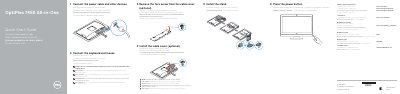

Dell OptiPlex 7450 All-in-One Quick Start Guide - cover page
Brand
DELL
Category
All-in-One Desktops
Document type
Quick Start Guide
Language
English
Pages
2
File format
PDF
File size
562 KB
Published
25 November, 2023
Updated
25 November, 2023
MD5 checksum
773D037949138D4B8A1F0948BB4B6BFC

About this manual

This document serves as a Quick Start Guide for the Dell OptiPlex 7450 All-in-One computer. It provides multilingual instructions for initial setup, including connecting the power cable, keyboard, and mouse, as well as installing the optional stand. The guide also covers the initial Windows 10 setup process.

What's inside

  • Connect the power cable
  • Connect the keyboard and mouse
  • Install the stand
  • Press the power button
  • Remove the Torx screw
  • Install the cable cover
  • Features
  • Finish Windows 10 setup
  • Connect to your network
  • Sign in to your Microsoft account

Frequently asked questions

What is the regulatory model of the OptiPlex 7450 All-in-One?

The regulatory model is W11C.

What is the first step to set up the hardware?

Connect the power cable and other devices.

What should you do after connecting to a network during Windows 10 setup?

Sign in to your Microsoft account or create a local account.

Is the cable cover installation mandatory?

No, securing the cable cover with the Torx screw is optional.

Download PDF (562 KB)

More DELL Manuals


View all DELL manuals →