
OptiPlex 3050 Small Form Factor Quick Start Guide.
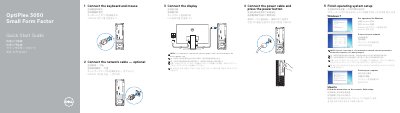
The Dell OptiPlex 3050 Small Form Factor Quick Start Guide provides step-by-step instructions for setting up the desktop computer, including connecting peripherals and completing the operating system configuration.
It includes a detailed layout of the system's features, identifying various ports such as USB 2.0, USB 3.0, HDMI, and DisplayPort, as well as power and network connectivity options.
| Rated Voltage | 100 - 240 V |
|---|---|
| Rated Frequency | 50 - 60 Hz |
| Rated Input Current | 4 A |
| Regulatory Model | D11S |
If the computer is ordered with a discrete graphics card, the display should be connected to that card.
The display should be connected to the discrete graphics card.
Enter the password for the wireless network access when prompted.
The computer has USB 2.0 ports and USB 3.0 ports.