
Key facts
Start here
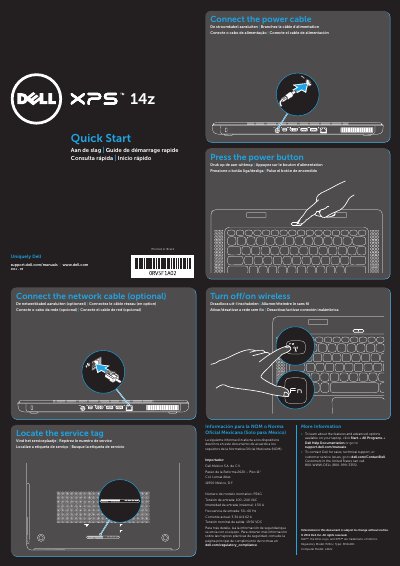
Dell 14z Laptop Quick Start Guide
This Dell 14z laptop quick start guide provides basic setup steps in multiple languages, including locating the service tag, turning wireless on or off, connecting the power cable, and pressing the power button.
It also lists the laptop's features, such as USB ports, HDMI, camera, and touchpad, and includes regulatory model information and Dell support contact details.
Dell 14z specifications
| Computer model | L412z |
|---|---|
| Regulatory model | P24G |
| Input voltage | 100–240 VAC |
All Dell 14z documents by type
The shortest path to a working setup, usually only a few pages.
Disassembly, diagnostics and part numbers, for repair.
Day-to-day operation, settings and troubleshooting. Start here if the product is already set up.
Questions answered in these manuals
What is the regulatory model number?
The regulatory model is P24G.
Where can I find more information about features and advanced options?
Click Start→ All Programs→ Dell Help Documentation or go to support.dell.com/manuals.
How do I contact Dell for sales or technical support?
Go to dell.com/ContactDell. Customers in the United States can call 800-WWW-DELL (800-999-3355).
What tools are recommended for performing the procedures in this manual?
The manual recommends using a Phillips screwdriver, a small flat-blade screwdriver, a plastic tracing point, and the BIOS update executable program.
What key should be pressed to access the Boot Device Menu?
Press the <F12> key when the F2 Setup or F12 Boot Options message appears in the lower right corner of the screen.