
Dell Inspiron 14z L412z Quick Start Guide

Dell Inspiron 14z Quick Start Guide
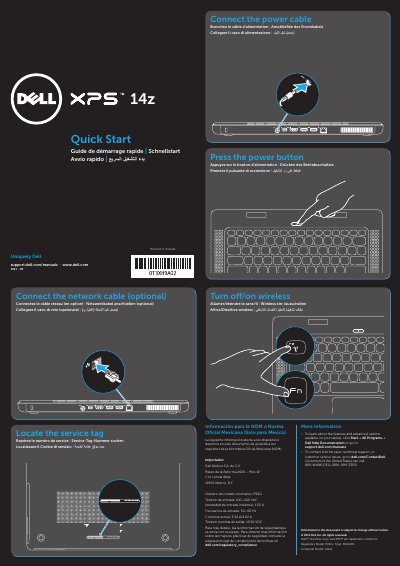

Dell Inspiron 14z L412z Quick Start Guide - cover page
Brand
DELL
Category
Laptops
Document type
Quick Start Guide
Language
English
Pages
2
File format
PDF
File size
296 KB
Published
20 November, 2023
Updated
20 November, 2023
Models
L412z, 14z
MD5 checksum
0E9C9AE538A5AD202AB13ACC97044F33

About this manual

This document serves as a multilingual Quick Start Guide for the Dell Inspiron 14z laptop, specifically model L412z. It provides initial setup instructions including locating the service tag, connecting power and network cables, and turning the device on. The guide includes regulatory information for Mexico and directs users to Dell's support website for further documentation.

What's inside

  • Quick Start Guide
  • Features
  • Security cable slot
  • AC adapter connector
  • Mini DisplayPort connector
  • HDMI connector
  • USB 2.0 connector
  • USB 3.0 connector
  • Network connector
  • Touchpad buttons

Specifications

Computer ModelL412z
Regulatory ModelP24G
TypeP24G001
Input Frequency50–60 Hz
Nominal Output Voltage19.50 VDC

Frequently asked questions

Where can I find more information about features and advanced options?

Click Start→ All Programs→ Dell Help Documentation or go to support.dell.com/manuals.

How do I contact Dell for sales or technical support?

Go to dell.com/ContactDell. Customers in the United States can call 800-WWW-DELL (800-999-3355).

Download PDF (296 KB)

More DELL Manuals


View all DELL manuals →