
Key facts
- Brand
- Casio
- Model
- YC-400
- Category
- Monitoring Equipment
- Industry
- Electronics
- Documents
- 4
- Languages
- EN
- Last added
- 2012-06-06
Start here
Casio YC-400 Business Document Startup Mode Quick Guide
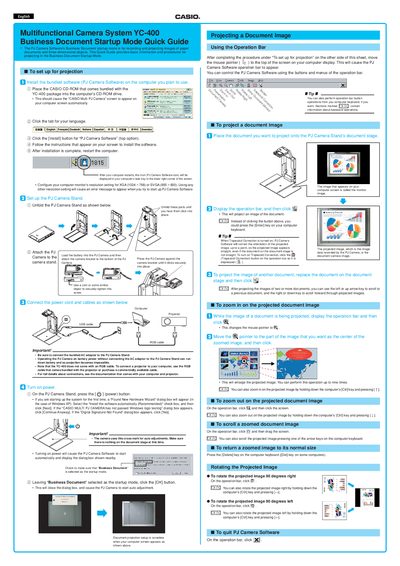
This document provides basic procedures for using the Casio YC-400 Multifunctional Camera System's Business Document Startup Mode. It covers installing the bundled PJ Camera Software, configuring the computer monitor resolution to XGA or SVGA, and setting up the camera stand with the AC adaptor.
Read onlineCasio YC-400 specifications
| Battery Type | Rechargeable lithium ion battery (NP-20) |
|---|---|
| Approximate Battery Life (Shots) | 540 shots |
| Dimensions | 87(W) x 57(H) x 23.1(D) mm |
| Weight (excluding battery) | Approximately 129 g |
All Casio YC-400 documents by type
Day-to-day operation, settings and troubleshooting. Start here if the product is already set up.
The shortest path to a working setup, usually only a few pages.
Questions answered in these manuals
What type of battery is required for this camera?
The camera requires a rechargeable lithium ion battery, specifically the NP-20 model.
Does the camera have a separate clock battery?
No, the camera does not have a separate battery for the clock; settings are cleared if power is cut off.
What resolution settings are required for the PJ Camera Software?
The computer monitor's resolution must be set to XGA (1024 x 768) or SVGA (800 x 600).
From: Casio YC-400 Business Document Startup Mode Quick Guide
Does the YC-400 come with an RGB cable?
No, the YC-400 does not come with an RGB cable; you must use one bundled with your projector or purchase a commercially available cable.
From: Casio YC-400 Business Document Startup Mode Quick Guide
What type of battery is required for this camera?
The camera requires a rechargeable lithium ion battery (NP-20).
Does the camera have an internal clock battery?
No, the camera does not have a separate battery for the clock; settings are cleared if power is cut off.