
Key facts
- Brand
- Casio
- Model
- FX-350MS
- Industry
- Electronics
- Documents
- 3
- Languages
- EN · ZH · JA
- Last added
- 2012-05-02
Start here
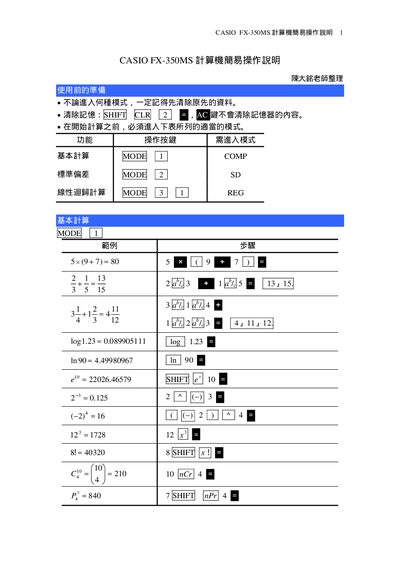
Casio FX-350MS Calculator Quick Start Guide
This guide provides step‑by‑step instructions for using the Casio FX-350MS calculator. It starts with preparation steps, explains how to clear memory, and shows how to select the appropriate calculation mode.
The manual then details basic arithmetic (COMP mode), standard deviation calculations (SD mode), and data entry procedures, including examples and weekly coefficient calculations. Each section includes the required key sequences for the functions. This manual is written in Japanese.
Casio FX-350MS specifications
| Power Supply | fx-82MS: Single AA-size battery (R6P (SUM-3)); fx-83MS/fx-270MS/fx-350MS: Single G13 button battery (LR44); fx-85MS/fx-300MS: Solar cell + G13 button battery |
|---|---|
| Battery Life | fx-82MS: ~17,000 hours continuous display; fx-83MS/fx-270MS/fx-350MS: ~9,000 hours; fx-85MS/fx-300MS: ~3 years (1 h/day) |
| Dimensions (mm) | fx-82MS: 118 (H) × 85 (W) × 156 (D); other models: 122 (H) × 85 (W) × 155 (D) |
| Weight | fx-82MS: 125 g; other models: 100 g (including battery) |
| Power Consumption | 0.0002 W |
| Operating Temperature | 0 °C to 40 °C (32 °F to 104 °F) |
Source: Casio fx-82MS, fx-83MS, fx-85MS, fx-270MS, fx-300MS, fx-350MS User Guide
All Casio FX-350MS documents by type
Day-to-day operation, settings and troubleshooting. Start here if the product is already set up.
The shortest path to a working setup, usually only a few pages.
Questions answered in these manuals
How do I replace the battery in the fx-82MS?
Turn the calculator off, remove the six screws holding the back cover, take out the old AA battery, insert a new one with the correct polarity, replace the cover and screws, then press the 5 key to power on.
From: Casio fx-82MS, fx-83MS, fx-85MS, fx-270MS, fx-300MS, fx-350MS User Guide
What is the input capacity of these calculators?
The calculators can hold up to 79 steps of input for a single calculation; each key press or operator consumes one step.
From: Casio fx-82MS, fx-83MS, fx-85MS, fx-270MS, fx-300MS, fx-350MS User Guide
How can I adjust the display contrast?
Press the contrast button repeatedly until the desired contrast level appears on the screen.
From: Casio fx-82MS/fx-82SX PLUS/fx-85MS/fx-220 PLUS/fx-300MS/fx-350MS User Manual
How are statistical calculations performed?
Select the SD or REG mode, input the data points as instructed, and then use the appropriate function keys to compute averages, regressions, and other statistics.
From: Casio fx-82MS/fx-82SX PLUS/fx-85MS/fx-220 PLUS/fx-300MS/fx-350MS User Manual
How do I clear the calculator's memory?
Press the HIEFT key to clear the memory.
Which mode is used for basic arithmetic calculations?
Select the COMP mode for basic calculations.