
Key facts
- Brand
- Yamaha
- Model
- P-85S
- Industry
- Industrial
- Documents
- 7
- Languages
- EN
- Last added
- 2012-07-02
Start here
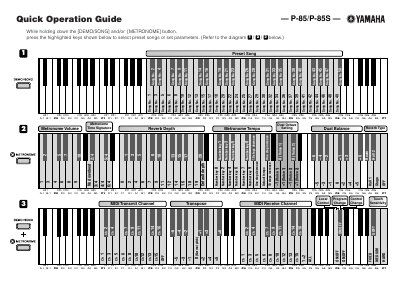
Yamaha P-85/P-85S Quick Operation Guide
This document serves as a Quick Operation Guide for the Yamaha P-85 and P-85S digital musical instruments. It provides visual instructions on how to select preset songs and configure various parameters by holding down specific keys while pressing others.
The guide covers settings for preset songs, metronome volume and tempo, reverb depth and type, and dual balance. It also includes instructions for adjusting pitch in cent steps and configuring MIDI transmit and receive channels.
Yamaha P-85S specifications
| Power adaptor models | PA‑5D, PA‑150 or equivalent |
|---|---|
| Required voltage | Voltage printed on the name plate |
| Keyboard | Hi Graded Hammer Standard Keyboard |
| Tone generation | AWM Stereo Sampling |
All Yamaha P-85S documents by type
Day-to-day operation, settings and troubleshooting. Start here if the product is already set up.
The shortest path to a working setup, usually only a few pages.
Questions answered in these manuals
What is the minimum wire size for a short extension cord?
The minimum wire size for a 25' cord or less is 18 AWG.
Can I connect this product to any power supply?
No, you must not connect it to any power supply other than one described in the manual or specifically recommended by Yamaha.
How do I select preset songs on the P-85/P-85S?
Hold down the [DEMO/SONG] and/or [METRONOME] button while pressing the highlighted keys shown in the diagram.
How do I raise the pitch on the P-85/P-85S?
Hold down the highlighted leftmost keys and press the other highlighted keys to raise the pitch in about 1 cent steps.
What power adaptor should be used with the Yamaha P‑85/85S?
Use the specified adaptor PA‑5D, PA‑150 or an equivalent recommended by Yamaha.
How should batteries be disposed of?
Dispose of used batteries according to local, state, and federal regulations and keep them away from children.