
The document is a song list, containing information and characteristics of different tracks.
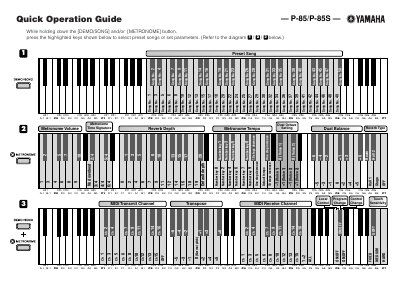
This document serves as a Quick Operation Guide for the Yamaha P-85 and P-85S digital musical instruments. It provides visual instructions on how to select preset songs and configure various parameters by holding down specific keys while pressing others.
The guide covers settings for preset songs, metronome volume and tempo, reverb depth and type, and dual balance. It also includes instructions for adjusting pitch in cent steps and configuring MIDI transmit and receive channels.
Hold down the [DEMO/SONG] and/or [METRONOME] button while pressing the highlighted keys shown in the diagram.
Hold down the highlighted leftmost keys and press the other highlighted keys to raise the pitch in about 1 cent steps.
The guide states that 100 cents equals 1 semitone.