
This document is the user manual for Philips DVP6600, DVP6620, DVP6688 DVD players, introducing the features and characteristics of the products and how to use them.
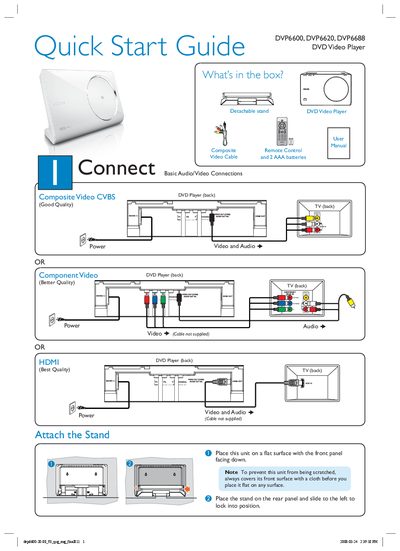
This quick start guide explains how to set up Philips DVP6600, DVP6620 and DVP6688 DVD Video Players. It shows the basic audio/video connections, how to attach the stand, and how to select the display language and other preferences.
The guide also lists the items included in the box, provides step‑by‑step instructions for turning the unit on, selecting the TV channel, starting disc playback, and troubleshooting common issues such as no power, no picture, or remote‑control problems.
| Video output options | Component Video (Better Quality), Digital, HDMI (Best Quality), Composite Video CVBS (Good Quality) |
|---|---|
| Audio connection | Audio IN (Cable not supplied) |
Make sure the AC power cord is securely connected and press the STANDBY‑ON button on the top panel to turn the unit on.
Load a disc, then press PLAY/PAUSE to begin playback; press STOP to stop.
The package contains a remote control with two AAA batteries, the user manual, a composite video cable, and a detachable stand.