
This document is a quick start guide for the DVD player DVP6600/DVP6620, which introduces the packaging contents, basic audio/video connection methods, and how to use the product.
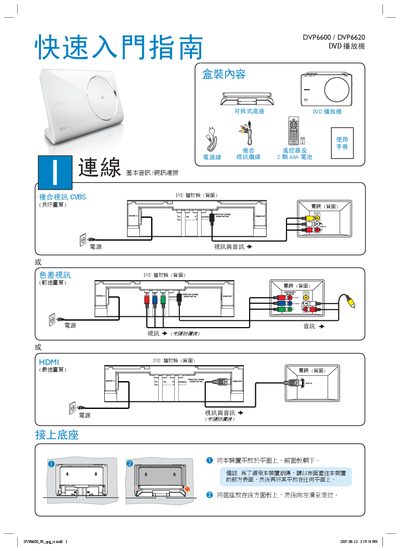
This Quick Start Guide is for the Philips DVP6600/DVP6620 DVD player. It lists the box contents, explains how to attach the stand, and shows basic audio/video connections to a TV using HDMI, component video, or composite video.
The guide also covers setup steps such as choosing the on-screen display language, starting disc playback, and troubleshooting common issues including no power, no picture, no sound, and remote control problems. Support information points to the printed user manual and www.philips.com/welcome. This manual is written in Chinese.
The box contains the DVD player, a remote control, 2 AAA batteries, and a detachable stand.
Press SETUP to open the settings page, select Display Language, choose a language option, and press OK to confirm.
Register the product and get support at www.philips.com/welcome, or refer to the printed user manual.