
This document is about the quick connect guide for MultiSync VT series LCD projectors. It mainly introduces the cables required to connect the projector, the connection steps, and the setting methods.
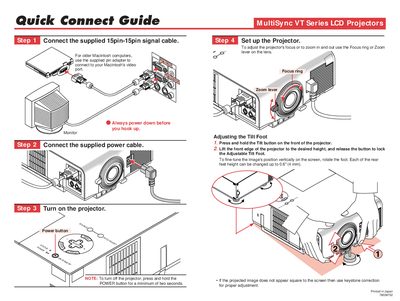
This guide provides step‑by‑step instructions for connecting the supplied 15‑pin signal cable, adjusting focus, zoom, and the tilt foot, and powering the projector on. It also explains how to use keystone correction and basic remote‑control functions.
The document details the projector’s on‑screen menus, including source selection, image options, language settings, and pointer controls, helping users fine‑tune picture quality and navigate the interface efficiently.
| Rear foot height adjustment range | up to 0.6" (4 mm) |
|---|---|
| Maximum image magnification | 400% |
Press and hold the Power button for a minimum of two seconds.