
Key facts
- Brand
- Linear Technology
- Model
- DC1096B
- Category
- demo board
- Industry
- Electronics
- Documents
- 2
- Languages
- EN
- Last added
- 2026-11-22
Start here
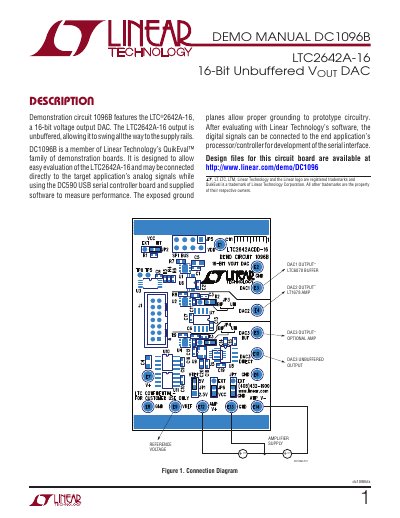
Linear Technology DC1096B Demonstration Circuit for LTC2642A-16 16-Bit Unbuffered V OUT DAC Demo Manual
DC1096B is a Linear Technology demonstration circuit for evaluating the LTC2642A-16, a 16-bit voltage output DAC whose unbuffered output can swing to the supply rails. It belongs to the QuikEval family of demonstration boards and can connect to a target application's analog signals while a DC590 USB serial controller and supplied software are used to measure performance.
Exposed ground planes support proper grounding to prototype circuitry, and after software evaluation the digital signals can be connected to an end application processor or controller to develop the serial interface. The manual covers quick start steps, power and jumper settings, output and reference connections, a parts list, and a schematic diagram.
Linear Technology DC1096B specifications
| DAC resolution | 16-bit |
|---|---|
| DAC output | Unbuffered |
| Output swing | To the supply rails |
| Selectable reference | 2.5V or 5V |
| LT1678 supply range | Up to ±15V |
| Software count range | 0 to 65535 decimal or 0000 to FFFF hexadecimal |
Source: Linear Technology DC1096B LTC2642A-16 16-Bit Unbuffered VOUT DAC Demonstration Board Demo Manual
All Linear Technology DC1096B documents by type
Day-to-day operation, settings and troubleshooting. Start here if the product is already set up.
Questions answered in these manuals
How is DC1096B connected to the DC590 controller?
Connect DC1096B to a DC590 USB serial controller using the supplied 14-conductor ribbon cable.
From: Linear Technology DC1096B LTC2642A-16 16-Bit Unbuffered VOUT DAC Demonstration Board Demo Manual
What reference voltages can be selected on JP1?
JP1 selects between the onboard 5V reference and the onboard 2.5V reference.
From: Linear Technology DC1096B LTC2642A-16 16-Bit Unbuffered VOUT DAC Demonstration Board Demo Manual
How do I connect the DC1096B to a PC?
Connect DC1096B to a DC590 USB serial controller using the supplied 14-conductor ribbon cable, then connect the DC590 to the host PC with a standard USB A/B cable and run the supplied evaluation software.
Does setting the software to bipolar mode configure the hardware?
No. Setting the software to unipolar or bipolar does not set the hardware to bipolar mode; the jumpers must be placed in their proper positions.