
Key facts
- Brand
- Agilent
- Model
- 2200 TapeStation
- Documents
- 5
- Languages
- ZH · EN
- Last added
- 2026-11-17
Start here
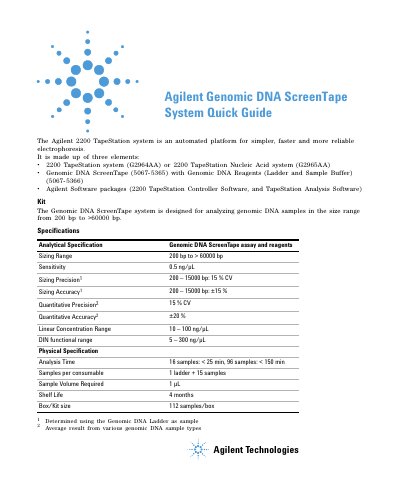
Agilent 2200 TapeStation Genomic DNA ScreenTape System Quick Guide
This quick guide explains how to use the Agilent 2200 TapeStation system for analyzing genomic DNA samples. It includes setup, sample preparation, and analysis steps. The system uses Genomic DNA ScreenTape and reagents with software for sizing and quantifying DNA in the 200 bp to >60000 bp range.
Key components include the 2200 TapeStation instrument, ScreenTape device, Genomic DNA Ladder, Sample Buffer, and Agilent software. Storage and handling instructions are provided to ensure accurate results and instrument safety. This manual is written in Chinese.
Agilent 2200 TapeStation specifications
| Sizing Range | 200 bp to > 60000 bp |
|---|---|
| Sensitivity | 0.5 ng/µL |
| Linear Concentration Range | 10 – 100 ng/µL |
| Analysis Time (16 samples) | < 25 min |
| Sample Volume Required | 1 µL |
| Shelf Life | 4 months |
Source: Agilent 2200 TapeStation Genomic DNA ScreenTape System Quick Guide
All Agilent 2200 TapeStation documents by type
The shortest path to a working setup, usually only a few pages.
How to use the product for one specific task, with worked examples.
Day-to-day operation, settings and troubleshooting. Start here if the product is already set up.
Questions answered in these manuals
What is the sizing range of the Genomic DNA ScreenTape system?
The sizing range is 200 bp to > 60000 bp.
From: Agilent 2200 TapeStation Genomic DNA ScreenTape System Quick Guide
What is the sensitivity of the system?
The sensitivity is 0.5 ng/µL.
From: Agilent 2200 TapeStation Genomic DNA ScreenTape System Quick Guide
What types of biological samples can the Agilent 2200 TapeStation system analyze?
The system is designed for quality control of RNA, DNA, and protein samples in various workflows.
How long does it take to review results per sample using the Agilent 2200 TapeStation system?
Users can expect to be reviewing results in about one minute per sample.
How long does it take to review results for a single sample?
You will be reviewing results in approximately one minute per sample.
What is the maximum volume of precious samples needed per run?
The system uses no more than 2 ul of your precious samples per run.