
Key facts
- Brand
- Sanyo
- Model
- PLC-XU55
- Category
- Projector
- Industry
- Electronics
- Documents
- 2
- Languages
- EN
- Last added
- 2012-08-03
Start here
Sanyo PLC-XU55 Projector Quick Start Guide
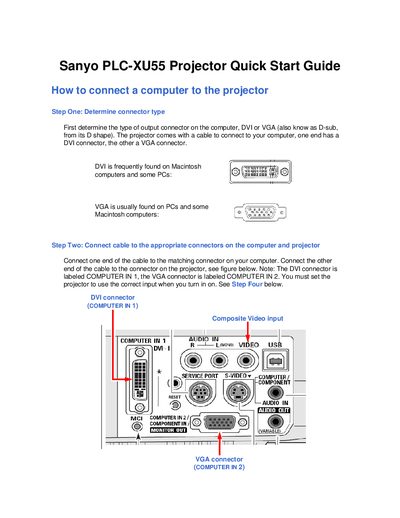
This guide explains how to connect a computer to the Sanyo PLC-XU55 projector. First determine whether the computer uses a DVI or VGA output, then use the supplied cable to connect the appropriate connector (DVI to COMPUTER IN 1 or VGA to COMPUTER IN 2) and power on both devices. Set the projector’s input source using the input button and arrow keys on the projector’s control panel.
The guide also covers connecting external video sources. The projector accepts S‑Video and Composite Video inputs (a composite cable is included). After connecting the video source, select the matching input on the projector and adjust the image using the zoom lever and focus ring.
All Sanyo PLC-XU55 documents by type
The shortest path to a working setup, usually only a few pages.
Day-to-day operation, settings and troubleshooting. Start here if the product is already set up.
Questions answered in these manuals
How long does the laser pointer function emit a beam when the button is pressed?
The laser pointer emits a beam for 1 minute while the LASER button is pressed.