
This document is a quick start guide to the Sanyo PLC-XU55 projector. It explains how to connect a computer to the projector.
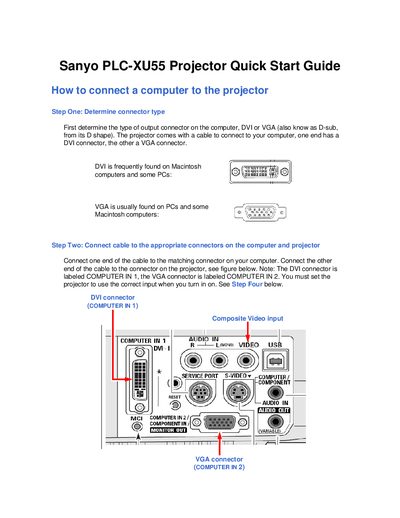
This guide explains how to connect a computer to the Sanyo PLC-XU55 projector. First determine whether the computer uses a DVI or VGA output, then use the supplied cable to connect the appropriate connector (DVI to COMPUTER IN 1 or VGA to COMPUTER IN 2) and power on both devices. Set the projector’s input source using the input button and arrow keys on the projector’s control panel.
The guide also covers connecting external video sources. The projector accepts S‑Video and Composite Video inputs (a composite cable is included). After connecting the video source, select the matching input on the projector and adjust the image using the zoom lever and focus ring.