
Key facts
Start here
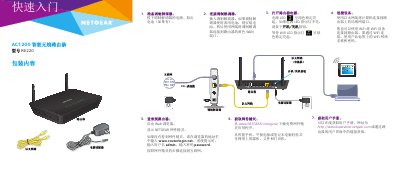
Netgear R6220 AC1200 Smart Wireless Router Quick Start Guide
This guide walks you through unpacking the router, connecting the modem to the yellow WAN port, powering the unit and attaching computers or other devices via Ethernet or Wi‑Fi. It also explains how to log in to the router’s web interface at www.routerlogin.net using the default admin/password credentials and how to download the Netgear Genie app for further configuration.
Additional sections cover Wi‑Fi setup (including SSID and password), WPS pairing, sharing USB storage or a USB printer on the network, and where to find technical support and product registration information. This manual is written in Chinese.
Netgear AC1200 specifications
| Management Interface Address | http://www.routerlogin.net or http://192.168.1.1 |
|---|---|
| Admin Login Username | admin |
| ISP Connection Type | PPPoE |
| Wi-Fi Settings Location | Label on the bottom of the router (SSID ending in 5G or 5GHz, and password/network key) |
| Reset Before Leaving | Hold the reset button for at least 10 seconds until all lights come on, which wipes the logon credentials |
All Netgear AC1200 documents by type
Mounting, wiring and first power-up. Read it before the hardware goes in.
The shortest path to a working setup, usually only a few pages.
Day-to-day operation, settings and troubleshooting. Start here if the product is already set up.
Questions answered in these manuals
How do I open the Netgear AC1200 management interface?
Connect to the router wirelessly, then open a web browser and type http://www.routerlogin.net or http://192.168.1.1.
What login details do I enter for the Internet connection?
Set the Internet Service Provider to PPPoE, enter your Single Sign On username including @OX.AC.UK, and use your Remote Access (Eduroam) password.
How do I log in to the router for the first time?
Open a web browser, go to www.routerlogin.net, and enter the default username admin and password password.
From: Netgear R6220 AC1200 Smart Wireless Router Quick Start Guide
How do I log into the router for the first time?
Open a web browser, go to www.routerlogin.net, and enter the default username admin and password password.
How can I recover a forgotten router password?
If password recovery is enabled, visit www.routerlogin.net, click Cancel, and answer the security question to reset the password.