
The Netgear R6220 Quick Start Guide shows how to set up the AC1200 smart wireless router, connect devices, configure Wi‑Fi and share USB storage or printer.
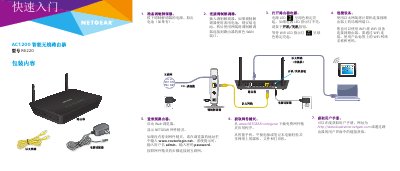
This guide walks you through unpacking the router, connecting the modem to the yellow WAN port, powering the unit and attaching computers or other devices via Ethernet or Wi‑Fi. It also explains how to log in to the router’s web interface at www.routerlogin.net using the default admin/password credentials and how to download the Netgear Genie app for further configuration.
Additional sections cover Wi‑Fi setup (including SSID and password), WPS pairing, sharing USB storage or a USB printer on the network, and where to find technical support and product registration information. This manual is written in Chinese.
| Wireless Standard | AC1200 |
|---|---|
| WAN Port Color | Yellow |
| Power LED Indicator | Green steady |
Open a web browser, go to www.routerlogin.net, and enter the default username admin and password password.