
Key facts
Start here
NETGEAR N150 Series Wireless Router WNR500 Quick Installation Guide
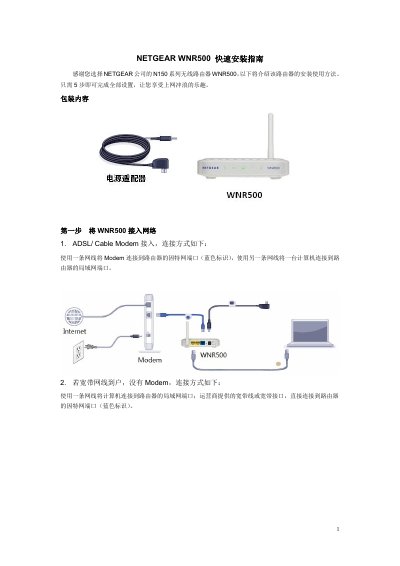
This guide details the five-step installation process for the NETGEAR WNR500 wireless router. It covers unpacking, connecting the device to the network, and logging into the management interface using default credentials. This manual is written in Chinese.
Read onlineNETGEAR WNR500 specifications
| LAN ports | 2 |
|---|---|
| WAN port | 1 |
| Power indicator | green when powered |
| Wireless indicator | green when wireless enabled |
All NETGEAR WNR500 documents by type
Day-to-day operation, settings and troubleshooting. Start here if the product is already set up.
Questions answered in these manuals
What are the default login credentials for the WNR500?
The default username is admin and the default password is password (all lowercase).
How can I reset the WNR500 to factory settings?
Press and hold the reset button for about 5 seconds while the router is powered on, then release.
What are the default login credentials for the WNR500?
The default username is 'admin' and the default password is 'password'.
From: NETGEAR N150 Series Wireless Router WNR500 Quick Installation Guide
How do I reset the WNR500 to factory settings?
Press and hold the reset button for 5 seconds while the router is powered on.
From: NETGEAR N150 Series Wireless Router WNR500 Quick Installation Guide