
Key facts
Start here
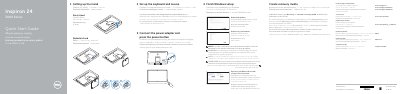
Dell Inspiron 24 3000 Series Computer Quick Start Guide
The Dell Inspiron 24 3000 Series Quick Start Guide shows how to set up the computer. It covers the easel or pedestal stand, keyboard and mouse setup, connecting the power adapter, and pressing the power button. It then describes finishing Windows setup, enabling Dell updates, connecting to a network, and signing in with a Microsoft account or creating a local account.
The guide also explains creating recovery media, using SupportAssist, registering the computer, and locating Dell apps. It lists product support and regulatory links, identifies the computer model as Inspiron 24-3459 and the regulatory models W12C and W12C003, and shows features such as USB ports, HDMI-in, audio-out, media-card reader, camera, and optional optical drive. The text appears in Greek, Portuguese, Russian, and Hebrew alongside English headings.
Dell Inspiron 24 3000 specifications
| Computer model | Inspiron 24-3459 |
|---|---|
| USB 3.0 ports | 2 |
| USB 2.0 ports | 2 |
| HDMI-in port | 1 |
| Optical drive | Optional |
Source: Dell Inspiron 24 3000 Series Computer Quick Start Guide
All Dell Inspiron 24 3000 documents by type
The shortest path to a working setup, usually only a few pages.
Day-to-day operation, settings and troubleshooting. Start here if the product is already set up.
Disassembly, diagnostics and part numbers, for repair.
- Dell Inspiron 24 3000 Series (Inspiron 24-3459) Service Manual 91 p
- Dell Inspiron 24 3000 Series Desktop Service Manual 77 p
- Dell Inspiron 24 3000 Series (Inspiron 24-3459) Service Manual 84 p
- Dell Inspiron 24 3000 Series Service Manual 79 p
- Dell Inspiron 24 3000 Series Service Manual 90 p
- Dell Inspiron 24 3000 Series Service Manual 78 p
- Dell Inspiron 24 3000 Series Service Manual 91 p
Questions answered in these manuals
Which stand types are shown?
The guide shows an easel stand and a pedestal stand.
From: Dell Inspiron 24 3000 Series Computer Quick Start Guide
What should I do when connecting to a secured wireless network?
Enter the password for the wireless network when prompted.
From: Dell Inspiron 24 3000 Series Computer Quick Start Guide
What is the minimum capacity required for a USB recovery drive?
A minimum capacity of 16 GB is required for the USB flash drive.
Which Dell applications are recommended for this computer?
Recommended applications include My Dell, SupportAssist, Dell Update, and Dell Digital Delivery.
What should I do before opening the computer?
Save and close all open files, exit applications, shut down, disconnect power and cables, remove media or optical discs, then press and hold the power button for about 5 seconds.
From: Dell Inspiron 24 3000 Series (Inspiron 24-3459) Service Manual
How do I update the BIOS?
Turn on the computer, go to www.dell.com/support, enter the service tag, open Drivers & Downloads, expand BIOS, download the latest file, and run it.
From: Dell Inspiron 24 3000 Series (Inspiron 24-3459) Service Manual